


- Featured
B2B Edition
Advanced B2B features for enterprise plans.Catalyst
NewCreate stunning, high-performing storefronts that captivate and convert.Feedonomics
Omnichannel feed and data transformation.Multi-Storefront
Manage multiple unique stores from one account.International
Grow your brand across the globe.

- Launch Services
Overview
Chart your path to success with specialized services.Implementation Project Management
Experts to ensure you launch on time and under budget.Solution Architecture
Seasoned advisors to help you best design your store.Data Migration & Optimization
Expertise on a clean and clear path to migrating your data.Enterprise Launch Package
Personal training on how to set up and launch your BigCommerce Store.

Professional Services Blog Series
Get to know our teams and how they support your success in this Q&A series.

The Global B2B Buyer Behavior Report
This in-depth report provides actionable strategies to help you sell more online.
Create your new website.
See if the BigCommerce platform is a good fit for your business.
No credit card required.
Updates to Sending Addresses for B2B Edition Emails

Written by
Vince Thompson01/06/2026

Updates to Sending Addresses for B2B Edition Emails
Get The Print Version
Tired of scrolling? Download a PDF version for easier offline reading and sharing with coworkers.
A link to download the PDF will arrive in your inbox shortly.
Starting on January 6, 2026, B2B Edition users will see a streamlined and more consistent experience in how their store’s emails are sent. Stores that have not connected an external SMTP server now use the sending address from the store profile for buyer-facing emails, while donotreply@bigcommerce.com is used for merchant-facing emails.
Why are we doing this?
Previously, all B2B Edition email notifications for buyers, merchants, and sales representatives were delivered from a legacy address: noreply@bundleb2b.com. Aligning B2B Edition emails with the BigCommerce email system not only reduces reliance on legacy email processes but also provides a more consistent experience for buyer notifications. A branded, recognizable email address boosts buyer confidence by confirming that your communications come from your store.
Configuring the sending address for B2B Edition emails
You will see no change in your store’s sending address if you have already connected an external SMTP server in the B2B Edition General settings. If you are not using an SMTP server, then your store will automatically use the default sending address in your store profile for buyer-facing emails — no additional setup is required.
You can view or update the sending address from the Email field in the Settings › Store profile area of your BigCommerce control panel.
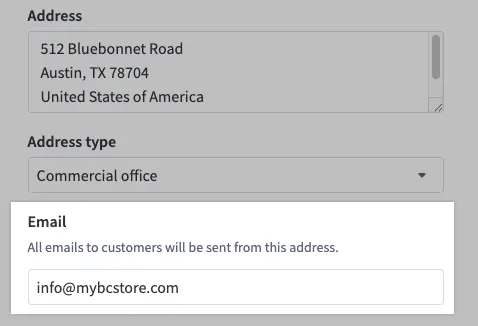
The new email configuration may affect existing email automations or filters set up by you or your buyers. You may need to update those rules to accommodate the new sending addresses if you have whitelisted or filtered emails based on the old noreply@bundleb2b.com address.
To learn more about emails in B2B Edition, see B2B Edition Email Templates.
The final word
Establishing a consistent and recognizable “from” address for buyers plays a major role in creating a professional and trustworthy B2B experience. B2B Edition ensures that all store emails come from a single source that is directly associated with your store’s domain.