Start & build


Launch Services
Overview
Chart your path to success with specialized services.Implementation Project Management
Experts to ensure you launch on time and under budget.Solution Architecture
Seasoned advisors to help you best design your store.Data Migration & Optimization
Expertise on a clean and clear path to migrating your data.Enterprise Launch Package
Personal training on how to set up and launch your BigCommerce Store.

Professional Services Blog Series
Get to know our teams and how they support your success in this Q&A series.


Bridging E-Commerce and Virtual Reality: A Glimpse into the Future with BigCommerce and Apple Vision Pro

Create your store and start selling today.
Create your new website.
See if the BigCommerce platform is a good fit for your business.
No credit card required.

Written by
Chris RuddellIn the bustling tech arena of THAT Conference in Round Rock, TX earlier this week, I had the privilege of showcasing an exciting frontier where e-commerce meets virtual reality. This blog post encapsulates the essence of my talk, where I delved into the intricacies of creating a seamless shopping experience using BigCommerce and Apple's groundbreaking VR product, the Vision Pro.
Introduction
The digital landscape is continually evolving, and with the advent of virtual reality (VR), the realms of possibility have expanded exponentially. Apple's Vision Pro has emerged as a beacon of innovation, offering a unique platform for developers to reimagine and redefine user interactions. In a demonstration that spanned an hour, I embarked on a journey with the audience to explore how the BigCommerce platform could be leveraged to create a compelling VR shopping experience.
The Genesis of a Virtual Storefront
Our journey began with the foundational steps of establishing an online store on BigCommerce. To keep things simple, I did not use any partner integrations or marketplace apps, and instead focused on the out-of-the-box solutions our platform provides. I had two products in mind, a hat and a mug both containing the logo of the conference.
Trial Creation: I walked the group through the steps necessary to create a new trial store, naming it “THAT Merchandising”.
Store setup: I set the store up with free shipping, a simple 8% global tax rate, and offline payments using the “Pay in store”. At each step I described how I was using the simplest of settings to get the store launched, but briefly explained some of the more advanced features our platform offers.
Product Listings: As mentioned above, I added two products to the store catalog, a hat and a mug. The reason for choosing these products was twofold:
I wanted something that represented a typical e-commerce shop (especially for people that might not have much experience in the industry)
I wanted something for which I could show a 3D model in the VR environment. I discussed this idea with my son who is really into game and graphic design, including the use of Blender. He was able to create simple models of the hat and mug in about 20 minutes, so they served as great examples to showcase the technology.
Venturing into the Virtual Domain
With the storefront set up, the talk transitioned to the integration with Apple's Vision Pro. I began by creating a new VisionOS project in XCode and walking the group through the basic project structure and code architecture for Apple’s Hello World application. This includes a floating window with some text and a button to toggle the interactive environment on or off. This sample environment has two 3D spheres in it, both of which appear side by side when the toggle button is on.
Of course, it would have been great to have actual Vision Pro hardware on premise to demonstrate this. But alas, at the time of the conference the Vision Pro had not yet been released to the public. Fortunately, Apple’s simulator provides a realistic demonstration of what the user would see if they were wearing the headset, and allowed me to show the demonstration to everyone at once using the monitor projection.
Showcasing the Storefront
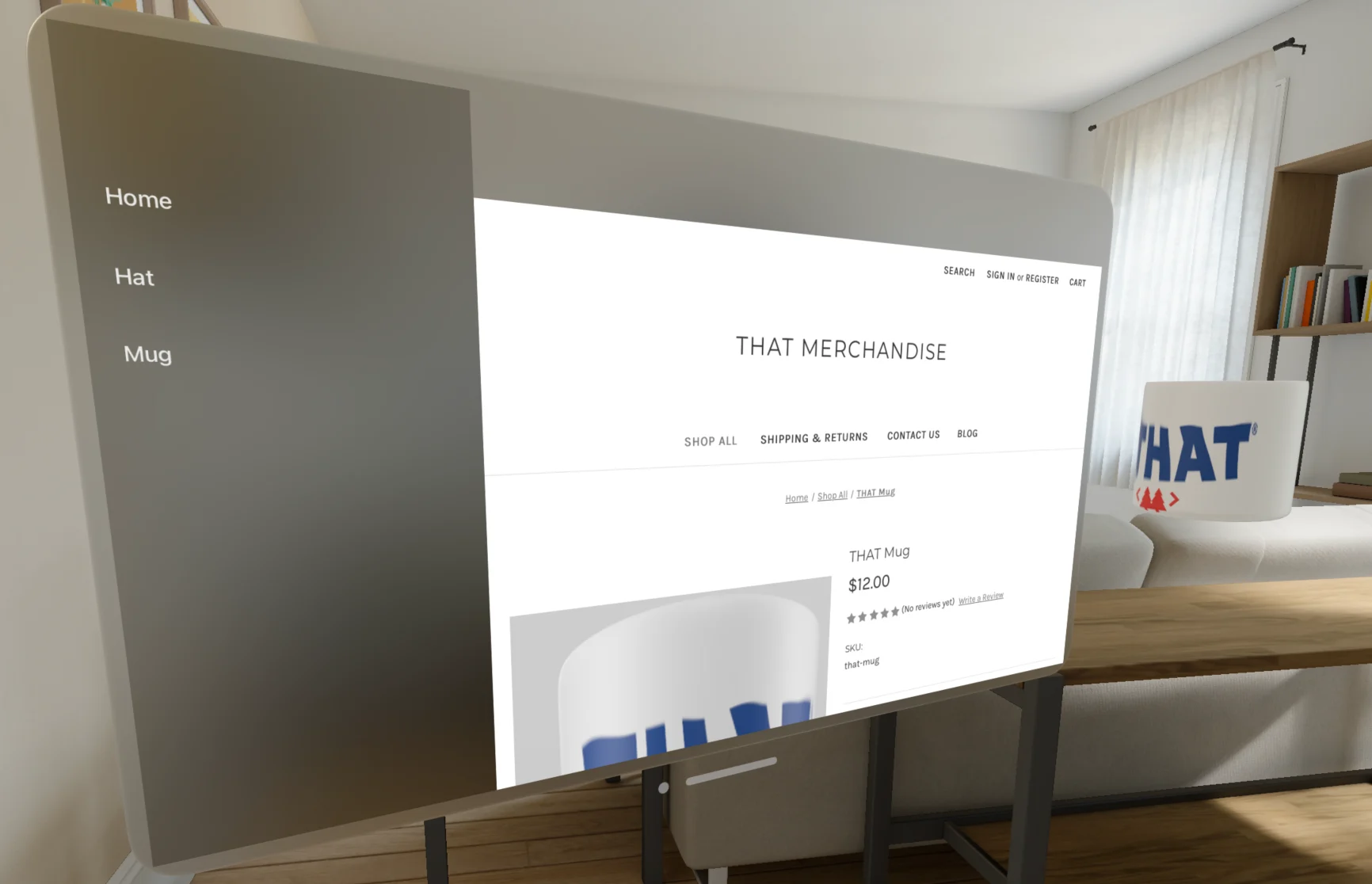
The first task was to bring the BigCommerce storefront to the virtual environment. To do this, I explained how the code defines the views displayed on the screen and showed how we could transform the floating window into a split navigation view, with a list on the left and the content on the right. In this way I was able to have links for “Home”, “Hat” and “Mug” in the list view, and replaced the content area with a webview pointed at our storefront’s url. With this simple change I showed how we were able to quickly turn a typical e-commerce storefront into a standalone native app on the Vision Pro.
Bringing Products to Life
The highlight of the talk was undoubtedly the demonstration of 3D models for the hat and mug within the virtual environment. This is where the website really came to life as I showed how we could show the products in 3D inside the user’s living space. Instead of a single scene showing the two spheres, I added two scenes, one for each product. Loading each product caused that product’s “scene” to appear. In this way only that product would be shown in 3D, and only if the website was loaded to that product’s page. This created an interactive feel to the website where the content of the website matched the 3D content of the app.
Receptivity
The talk went over really well. I had 2 or 3 times as many people in attendance as I did for my talk last year on server-driven UI, and everyone seemed very engaged and enthusiastic about the presentation. I had several questions about what could be done with BigCommerce, including questions about the api’s and store customizations. I also had requests to share the code with the group and have since posted it to GitHub at GitHub - cruddell001/VisionProECommerceDemo: E-Commerce Demo for the Vision Pro .
The final word
Having the opportunity to speak for a second year in a row at THAT Conference was one that I truly enjoyed. I got to meet some great people in tech from around the world, and was able to show how engaging and transformative e-commerce can be. If you’re ever interested in growing as a communicator and building your network, I strongly recommend seeking out similar opportunities.
Build more than code. Build connections.
From edge cases to workarounds, learn from developers solving things in real time.