Start & build


Launch Services
Overview
Chart your path to success with specialized services.Implementation Project Management
Experts to ensure you launch on time and under budget.Solution Architecture
Seasoned advisors to help you best design your store.Data Migration & Optimization
Expertise on a clean and clear path to migrating your data.Enterprise Launch Package
Personal training on how to set up and launch your BigCommerce Store.

Professional Services Blog Series
Get to know our teams and how they support your success in this Q&A series.



Create your new website.
See if the BigCommerce platform is a good fit for your business.
No credit card required.

Written by
Chris NanningaThe BigCommerce B2B Buyer Portal provides a fully featured B2B shopping experience out of the box for all B2B Edition stores. The open source nature of the Buyer Portal also gives you the flexibility to make this experience wholly your own, enhancing the React application with any custom UI or functionality needed for your storefront.
In the previous entry in this series, Routing and Navigation, we built a simple new “overview” page in the Buyer Portal. Our focus in this second tutorial will be expanding this page with session information from the global data store and data fetched via GraphQL.
Prerequisites and Setup
This tutorial will require:
B2B Edition: You will need a BigCommerce store with B2B Edition enabled on a Stencil storefront.
Node.js: Ensure you have Node.js version >=22.16.0. It is recommended to use nvm(link) to manage your Node installation.
Yarn Package Manager: The Buyer Portal uses the Yarn package manager, which you can install globally using npm:
npm i -g yarn.A custom fork of the Buyer Portal
This exercise picks up where we left off in Routing and Navigation, and requires the code that was covered there! If you need a fresh setup, follow the steps below.
Clone the starting repo with:
git clone --branch state-start https://github.com/bigcommerce-edu/demo-b2b-buyer-portal.gitFollow the remaining steps (after the fork/clone step) detailed in Customizing the B2B Buyer Portal: First Steps.
Once you have your Buyer Portal running in a local environment and have updated your B2B Edition scripts per the steps in our previous guide, you’re ready for the steps ahead!
Redux in the Buyer Portal
As a core function, React applications manage pieces of state. It’s simple to establish state for a single component, and components can even share state by passing objects in props. Complex single-page applications like the Buyer Portal, however, often require a large amount of global state accessed throughout various levels of the UI, and this can quickly become unwieldy.
Redux is a library that simplifies this kind of global state management. Redux itself is a large topic, and you can dive into the details in the documentation. The key concepts to be aware of are:
Global state lives in an object called a store.
Data in the store is updated immutably, meaning that the original state object isn’t changed directly. A new state is calculated whenever an update action occurs.
Your code updates global state by dispatching an action to the store.
The store implements reducers, functions that receive the old state and an action, then return a new state.
Your code accesses values from the store with selector functions.
Redux Toolkit allows the global state to be segmented into slices, which also provide convenient patterns for defining reducers and exporting selectors.
In the Buyer Portal, the following key files/directories are key to the use of Redux to manage the user’s various session data:
NOTE: Throughout this tutorial, all file paths are relative to app/storefront/src, the root of the main Buyer Portal application.
store/slicescontains files defining the various slices. For example, the slice incompany.tsmanages session data like the user’s company and role.quoteInfo.tsmanages data about the current draft quote. Examining the interfaces in each of these files will make it clear what data is available from the global state. Each slice exports its actions and reducer.store/reducer.tsis where each slice is added to a combined reducer.store/index.tsinitializes the global store, exports all slices, and exports hooks that components can use to dispatch actions, select data from the store, or access the store itself.
The following steps will provide an example of the useAppSelector hook for accessing global state.
The Identity Component
NOTE: Remember that all file paths are relative to app/storefront/src.
In this step, we’ll add an “Identity” section to the overview page that will ultimately display the details of the logged-in company user.
First, let’s create the new component with placeholder content.
1. Create the file pages/Overview/components/Identity.tsx with the following contents.
Once again, this code uses components from the Material UI library to build the main UI. Exploring Material UI isn’t our primary focus here, but note that we’re making use of a Grid container with three Grid items. The xs and lg props of each item define their size in a 12-column layout by default and on large screen sizes, respectively.
2. Open the file pages/Overview/index.tsx and add the Identity component, replacing the previous “Hello world” message.
Accessing Company User Info with Redux
What we need in order to access information in the Redux store is the useAppSelector hook exported from the store initialization file.
1. Open the file pages/Overview/components/Identity.tsx, add the import for useAppSelector, and fetch the company slice within your component.
A look at store/slices/company.ts will tell you what details to expect in the company slice, defined in the CompanyState interface.
2. Destructure the information we need from company, which contains the objects companyInfo and customer, each with various values our component requires.
3. Replace the placeholder text in each grid item with the appropriate values.
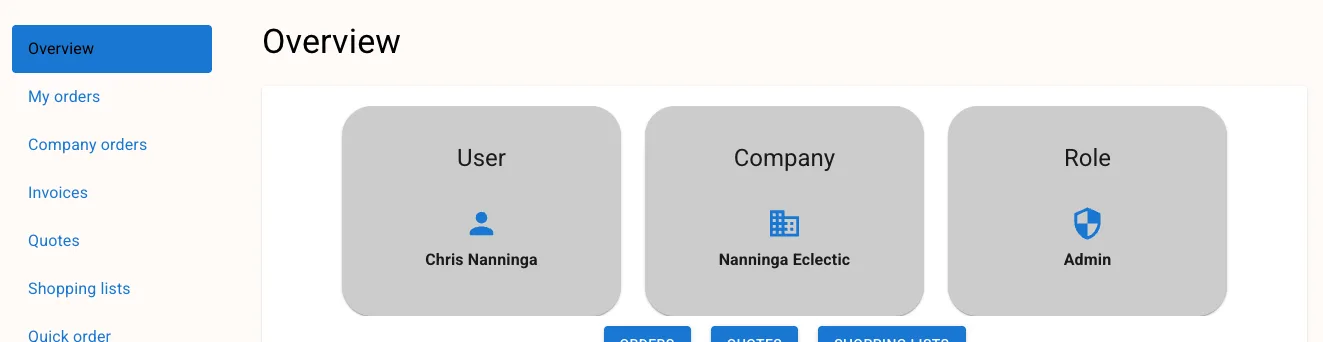
Your overview page should now reflect the accurate information for your logged-in user, pulled from the application-wide data store. Log in as a company user in your storefront and navigate to the Overview page to verify.
B2B GraphQL Queries in the Buyer Portal
The B2B GraphQL API is the core web service used to fetch and manage B2B details in the Buyer Portal. Requests to the GraphQL API require a storefront token unique to the authenticated B2B user.
If you re-examine store/slices/company.ts, you’ll see that the global state representing the user’s session includes a tokens object that contains a B2BToken. When a user logs in, a token is retrieved and set on this state value, which can be used for all requests to the B2B GraphQL API.
Now that you know the basics of retrieving values from the global Redux store, consider that it would be simple to directly retrieve this token value and craft a GraphQL request:
It’s not necessary to be this granular, however. The Buyer Portal already includes an abstraction layer to handle the details of GraphQL requests, including management of authentication. In the following section, we’ll craft a B2B GraphQL query and use B3Request to fetch data about company orders.
Making a Custom GraphQL Query
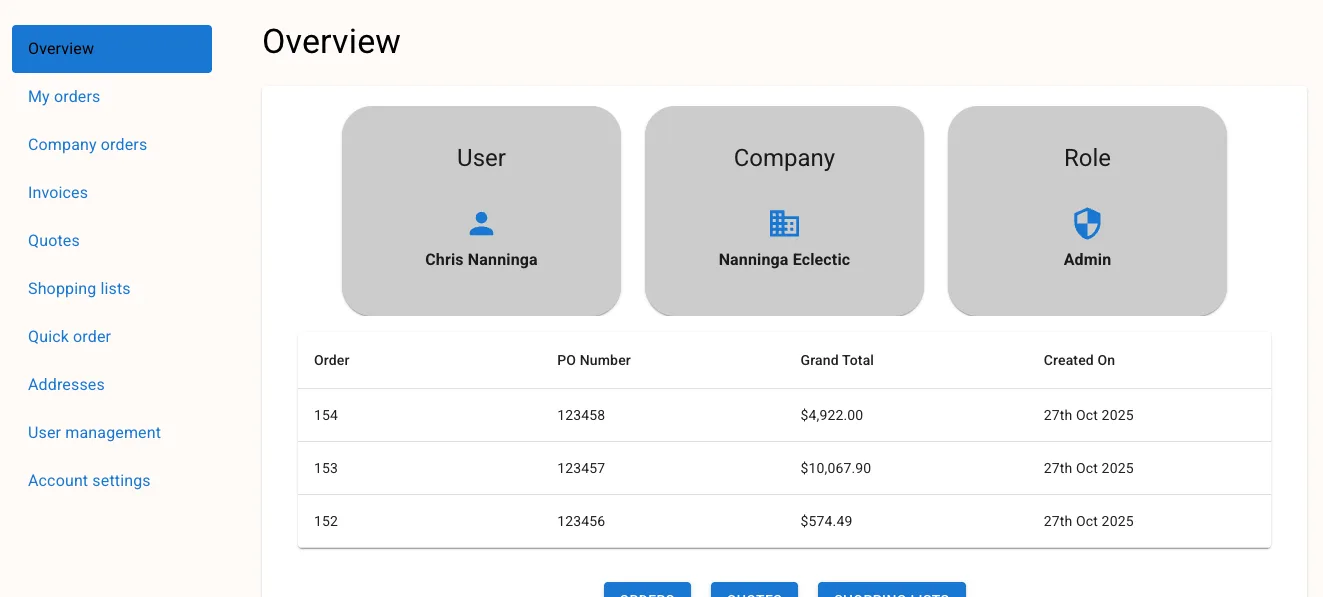
The final section we’ll add to the overview page is a table displaying the company's most recent 5 orders.
Let’s start by defining the B2B GraphQL query itself.
1. Create the file pages/Overview/data.ts with the following contents.
Note that the query uses variables for the record limit and sort order, making it flexible for reuse. The two interfaces defining the shape of an individual order (OverviewOrder) and the full GraphQL response (RecentOrdersResponse) will assist Typescript in validating our code that parses the data.
2. Add an import of B3Request and the main function to perform the fetch.
Our code doesn’t need to concern itself with how the B2B storefront token is managed or retrieved from the Redux store, with B3Request handling this for us.
Note the use of map to form a flattened array of orders from each node in allOrders.edges in the response. getRecentOrders will return an array where each item has an orderId, poNumber, etc.
NOTE: Our use of the RecentOrdersResponse type assertion tells Typescript what to expect but doesn’t actually validate that the response data matches this. Our code currently lacks any actual error handling for the GraphQL fetch. Zod is an effective library for validation in a scenario like this.
3. Create the file pages/Overview/components/RecentOrders.tsx with the following contents.
A significant aspect of this component is its use of the Buyer Portal’s native B3Table, which provides sophisticated rendering of tabular data. We’re providing the orders state, containing the array of order records, as the value of listItems, meaning each order item will be rendered as a row in the table. We’ve also implemented a callback for onClickRow, using the same setOpenPage navigation function as the overview page to link to the individual order.
B3Table currently lacks any information about what columns should be displayed in the table.
4. Add the following columns config in RecentOrders, making sure to set the value of the columnItems prop.
Note that each item in orderColumns has a key corresponding to one of the fields on each order in the GraphQL response data. B3Table will render the matching field’s value in the column for each order row. For totalInclTax and createdAt, we’ve included an explicit render callback function, transforming the field value before its final rendering.
5. Open the file pages/Overview/index.tsx and add the RecentOrders component.
You should now have a table of recent orders included in the overview page.
Taking It Further
In this tutorial, we practiced selecting existing values from the global store. In some scenarios, you might need to update state values as well, or even establish your own slices for unique session information. Keep the following in mind:
The
useAppDispatchhook will return a dispatch function. Use this in combination with an action exported from a slice to update state.Create new slices in
store/slices. Each slice must be initialized with a starting state and a collection of reducer functions, and each slice file exports the slice object’sreducerand actions from itsactionsproperty.Each slice’s reducer must be added in
store/reducer.ts, and an export of the slice’s contents can be added tostore/index.ts.
The final word
Our simple examples in this tutorial have introduced you to key concepts for the use of Redux and GraphQL in the B2B Buyer Portal.
With the concepts covered in this series, you have the basic building blocks necessary for crafting your own Buyer Portal experience. In summary, we’ve covered:
Examples of Material UI components
Page routing configuration
Navigation
Retrieving and managing global state
Performing GraphQL queries with built-in tools
Happy coding!
Build more than code. Build connections.
From edge cases to workarounds, learn from developers solving things in real time.