- Start & Build

Product Overview
What you can do with BigCommerce.
Agentic Commerce
 AI-powered solutions for growth.
Design Your Store
Build your store with or without code.
Apps & Integrations
Over 1,200 apps to help you grow.
Migrate to BigCommerce
Switch from Shopify, Woocommerce, Salesforce, Magento, and more.
- Launch Services
Overview
Chart your path to success with specialized services.Implementation Project Management
Experts to ensure you launch on time and under budget.Solution Architecture
Seasoned advisors to help you best design your store.Data Migration & Optimization
Expertise on a clean and clear path to migrating your data.Enterprise Launch Package
Personal training on how to set up and launch your BigCommerce Store.

Professional Services Blog Series
Get to know our teams and how they support your success in this Q&A series.

The Global B2B Buyer Behavior Report
This in-depth report provides actionable strategies to help you sell more online.
Keep it Streaming: Understanding Suspense in NextJS

Create your store and start selling today.
Create your new website.
See if the BigCommerce platform is a good fit for your business.
No credit card required.

Written by
Andrea DaoIn today’s era, being able to get what you want in no time is on everyone’s wishlist. Accessing data on the internet is no different: shoppers want info quickly and to know that their webpage is responding.
So how can we quickly load data onto the UI? One way is to allow static data or data that takes less time to fetch to display first. Data that takes longer to fetch can trickle in later. You can also display a fallback that users see before slower data appears. The fallback provides immediate feedback so users aren’t left wondering.
In NextJS, we can do this using Suspense and Streaming, which builds on React Suspense and adds some convenient features. In fact, NextJS uses server-side rendering by default, which provides another benefit for data fetching, which we’ll explore.
To show how these features are useful, we’ll use an example where we simulate a fetch for products and load them onto a page. We’ll start by fetching data on the client-side, show the benefits of using server-side rendering instead, and finally incorporate Streaming and Suspense into the picture.
Prequisites
Clone the nextjs-suspense github repository and install dependencies.
Client Components
First, let’s explore how we can implement the page component as a client component. In the following example, the page component fetches data and renders in the browser.
In the example repo, check out the client branch. Notice the ‘use client’ directive at the top of the app/page.jsx file, marking the page (and child) components in the file as client components.
Start your local development server and visit the app home page (e.g. localhost:3000). You should see a heading that says “Products” and a piece of loading text. After a few seconds, a fetched list of products replaces the loading text.
By the naked eye, the UI experience looks fine. The loading text provides immediate visual feedback, letting the user know data is being loaded until the dynamically fetched data gets returned. If you look through the code, however, you’ll see that it uses many moving parts to fetch data and produce the desired UI experience.
For one, our example simulates a fetch to the BigCommerce backend to get product data. Since our page component renders on the client side, we had to proxy the fetch request to the backend through an API route handler to avoid exposing potential API keys to the client. Hence, you’ll see the app contains a route.ts file for this purpose (see the /api/products folder).
Additionally, we had to manually trigger the data fetching on the initial page render using useEffect. We also manually set the loading state to specify when to render the loading text, then update the loading state again after asynchronous data is loaded. This amounts to using two additional React hooks (useEffect and useState).
That’s a lot of moving parts. To simplify, we’ll start building the example from the ground up in a server component.
Server Components
In Next.js, components are React Server Components by default which means the executing code is run on the server, not on the client.
We’ll start by showing static product data first without actually handling a loading state.
Check out the server-static-data branch. The page component in app/page.jsx renders the static product data.
Start your local development server. You should see the product data appear on the app homepage.
Notice in the app/page.jsx file that the page component also logs “Rendering…” into the console. But if you open the browser console on the home page, you won’t see “Rendering…” output in the console. This is because the log is being run on the server, not the browser. Instead, the output will show up in the terminal where server logs appear.
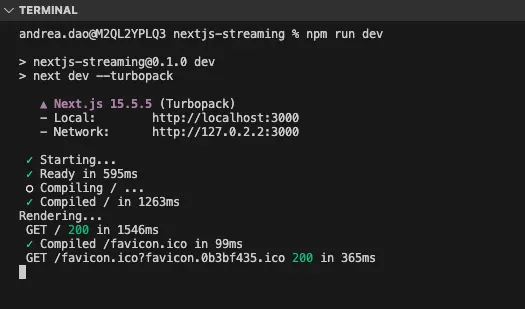
So with Server Components, code is run on the server, not on the client. Why is this helpful?
Since the server processes the data fetching, the data fetching code isn’t sent to the client. The client just receives static HTML, which means less overall bytes that are sent to the browser.
Additionally, secret environment variables are not sent to the browser either. Since this example is using server components, you no longer need to use API route handlers to proxy your API requests.
Server component with async data
So far, we’ve eliminated one moving part from our example (the need for API Route handlers). We also have removed the useEffect and useState hooks, but we aren’t yet handling a loading state since we’re just returning static data.
Let’s take a look at a data fetch with this exercise.
Check out the server-dynamic-data branch. The component in the app/page.jsx file returns product data after a three-second delay. The component is marked as async and uses await. The title is static data that isn’t fetched.
Start the development server and visit the app home page. You should see that the entire page takes three seconds to load. The title doesn’t load even though it is static data that could load instantly.
In short, asynchronously loaded data blocks the entire UI until the data is finished loading. Because of this, we need a more efficient way to handle asynchronous data fetching. To help address this problem, we’ll need to tackle the next concept: data streaming with suspense.
Data streaming with suspense
React Suspense allows you to display a fallback UI (loading state) in the client while data fetching is happening on the server. Then, when data fetching is complete, that data is streamed to the client and replaces the fallback UI.
Here, we’ll add Suspense boundaries to prevent the async product data from blocking the entire page. Our page will respond with static data, including the fallback, in the initial HTML that it sends to the browser. The product data will stream in after it gets fetched.
For the final code, you can check out the suspense branch in the repos, or you can also follow along below to add Suspense to the server-dynamic-data branch.
To start, revisit the page component in the page.jsx file on the server-dynamic-data branch. You should see the following code:
Suspense boundaries have to wrap the data fetch and can’t sit inside a component that is doing the data fetching. Because of this, we’re going to move the data fetching to a separate Products component.
Next, import Suspense from React and wrap the Products component in a Suspense boundary.
If you refresh the page, you’ll see the Products heading and the fallback load immediately in the UI, followed by the fetched products.
Suspense with Multiple Async Data Fetches
Suspense boundaries also let you have granular control over streamed data when you have multiple asynchronous data fetches. This way, the data fetch that takes longer doesn’t block the data fetch that takes less time.
To see this in action, check out the multiple-data-fetches branch. The app now simulates two fetches for products, one that takes two seconds and one that takes five seconds. Here, we have two suspense boundaries. We’ve nested the suspense boundary for the slower data fetch inside the suspense boundary for the faster fetch.
If you refresh the page, you should see the outer boundary suspends until the faster product fetch loads. The inner boundary then takes over until the slower product fetch loads (two chunks of streamed data).
Loading.js file
If you want granular control, you should manually create Suspense boundaries. However, for convenience, NextJS lets you create a suspense boundary around the entire page using a loading.js file. The suspense boundary gets applied behind the scenes to all child and nested pages.
To see an example of this, check out the loading-js branch. The app/loading.js file exports the fallback component. When you visit the app homepage, you should see the “Loading products…” fallback for the entire page.
What’s next?
Similar streaming and loading patterns are built into Catalyst with NextJS.
To dive deeper into the intricacies of streaming and data loading in Next.js, check out the Vercel Ship Workshop material, led by James Quick.
You can also tune into his presentation at the Infobip Shift 2025 conference (49:46): https://www.youtube.com/watch?v=aK00Cow8nB8&t=2986s
Build more than code. Build connections.
From edge cases to workarounds, learn from developers solving things in real time.