




Written by
Mandy Spivey07/31/2026

Augmented Reality in Ecommerce: How it Works and How to Use it
Get The Print Version
Tired of scrolling? Download a PDF version for easier offline reading and sharing with coworkers.
A link to download the PDF will arrive in your inbox shortly.
Key highlights:
AR recreates in-store confidence online. Augmented reality in ecommerce overlays true-to-scale 3D product models onto a shopper's real environment, letting them try on, place, and inspect products before buying.
Adoption has hit critical mass. More than 100 million consumers used AR shopping features in 2025, and the AR-in-ecommerce market will grow from about $5.9 million in 2024 to $38.5 million by 2030.
It moves the two metrics that matter most. Virtual try-on drives meaningful conversion lifts while cutting returns by an estimated 25% to 48%, with the biggest impact in fit-heavy categories like apparel, footwear, and furniture.
Four use cases cover most needs. Merchants apply AR through virtual try-on, in-space product placement, interactive manuals, and social AR filters — each removing a specific point of purchase hesitation.
Starting is easier than it looks. Pick one high-friction product category, choose a low-friction WebAR or app-based approach, and trial an AR app or brief a 3D-model vendor before scaling.
Augmented reality in ecommerce is technology that overlays digital 3D product models onto a shopper's live view of the real world through a phone, tablet, or AR glasses. It lets online shoppers try on products, preview them at true scale in their own space, and inspect them from every angle before buying. In practice, it recreates the "touch and try" confidence of a physical store inside a digital storefront.
Online shoppers can't hold a product, judge its real size, or try it on before they buy. That uncertainty drives cart abandonment and costly returns. Augmented reality in ecommerce closes that gap by putting the product in the shopper's hands — virtually.
If you’re new to AR, here’s a quick rundown on the basics:
What it is: AR layers interactive 3D product models onto a shopper's real environment via their device camera.
Top use cases: virtual try-on, in-space product placement, interactive manuals, and social AR filters.
Headline benefits: higher engagement, stronger conversion, and fewer returns.
How to start: pick one high-friction product category, choose a WebAR or app-based approach, then trial an AR app or brief a 3D-model vendor.
This guide covers what augmented reality is, how it differs from VR, the main types of AR applications, current adoption data, how merchants use AR, real brand examples, the business case, and a step-by-step path to launch it in your store.
What is augmented reality?
Augmented reality (AR) is technology that adds digital content (i.e., 3D models, information, or animations) onto a live view of the real world. Unlike a fully virtual environment, AR keeps your real surroundings visible and layers digital experiences and elements on top of them in real time.
AR works through a device camera and sensors. Software reads the physical scene, anchors digital objects to it, and keeps them in place as you move. The result feels like the digital object is really there.
A quick example: point your phone at your living room and place a true-to-scale 3D sofa on the floor. Walk around it, check the color against your walls, and confirm it fits before ordering. Or aim the camera at your face and see how a pair of glasses looks from every angle.
That is the in-store sensory experience — try-on, true scale, and real-world context — recreated online. Modern AR runs on widely available frameworks: Apple's ARKit on iOS, Google's ARCore on Android, and WebAR, which runs in a mobile browser with no app download. (More on tooling in the implementation section below.)
AR vs VR: What's the difference?
The difference between AR and VR is simple: AR adds digital elements to your real surroundings, while VR replaces them entirely with a simulated environment. AR enhances the real world; VR builds a new one.
That single distinction shapes everything else — hardware, cost, and how many shoppers can actually use each technology. For a deeper look at the immersive side, see BigCommerce's guide to virtual reality in ecommerce.
Factor | Augmented reality (AR) | Virtual reality (VR) |
Immersion | Blends digital with the real world | Fully immersive, replaces the real world |
Hardware | Smartphone or tablet most people already own | Dedicated headset (e.g., Meta Quest 3) |
Accessibility | High — billions of AR-capable phones | Lower — requires headset purchase |
Ecommerce use case | Try-on, product placement, previews | Virtual showrooms, immersive brand worlds |
AR augments the real world; VR replaces it.
AR keeps you grounded in your actual space and adds a digital layer, such as a virtual couch on your real floor. VR seals you off from your surroundings inside a headset and drops you into a fully rendered environment.
AR is more portable; VR needs dedicated hardware.
AR runs on the phone in your pocket, so shoppers can use it anywhere with no extra gear. VR typically requires a standalone headset like the Meta Quest 3, which adds cost and friction to the experience.
More shoppers can access AR than VR.
Because AR runs on standard smartphones, its potential audience is far larger than VR's headset-owning base. For merchants, that reach makes AR the more practical starting point for most product catalogs.
Types of AR applications
There are five main types of AR applications, and each triggers digital content differently. Understanding them helps you match the right approach to your products and your shoppers' devices.
Marker-based AR: Triggers a digital overlay when the camera recognizes a specific image, QR code, or pattern. A shopper scans a code on packaging to launch a 3D demo of the product inside.
Markerless AR: Uses a device's sensors to map surroundings and place objects on real surfaces without a trigger image. This powers most in-space furniture and décor previews, letting shoppers drop a lamp onto their real table.
Location-based AR: Anchors digital content to a physical GPS location. A retailer can surface AR promotions or wayfinding when a shopper is near a store or a specific display.
Projection-based AR: Projects light or images directly onto physical surfaces to create interactive displays, often used in stores and showrooms rather than at home. Shoppers interact with the projected content by touch or gesture.
WebAR (browser-based AR): Runs AR directly in a mobile web browser with no app to download. WebAR is the biggest recent unlock for ecommerce because it removes the single largest barrier to AR adoption — the install step — letting shoppers tap a link and view a product in their space instantly.
WebAR matters most for merchants. Every extra step costs conversions, and asking shoppers to download an app before they can preview a product loses many of them. Browser-based AR meets shoppers where they already are.
Augmented reality in ecommerce statistics
AR in ecommerce is scaling fast, adoption has crossed 100 million users, and “try before you buy” features consistently lift conversion while cutting returns — though the exact figures vary by source and category.
The augmented reality in ecommerce market was valued at about $5.9 million in 2024 and is projected to reach $38.5 million by 2030, a 35.8% CAGR.
The broader augmented reality market is projected to grow from roughly $170 billion in 2026 toward $1 trillion by 2033.
More than 100 million consumers used AR shopping features in 2025, with adoption concentrated among Gen Z and Millennial shoppers.
Around 75% of shoppers say AR features help them discover and assess products before buying.
Virtual try-on reduces return rates by an estimated 25% to 48% across categories, with fit-heavy categories like footwear and apparel seeing the largest impact.
Online apparel return rates sit between 30% and 40%, which is the core problem AR try-on is built to address.
A note on source quality: some widely repeated figures — such as "94% higher conversion for 3D/AR products" or "66% of shoppers want AR" — trace back to older or vendor-funded studies and are hard to verify against a current primary source. Treat them as directional, not settled fact, and lean on the sourced ranges above.

Ecommerce, with style.
Sell products the fashionable way — with more flexibility and ready for growth.
How ecommerce businesses use augmented reality
Brands use AR in four main ways: virtual try-on, in-space product placement, interactive manuals, and social AR filters. Each has the goal of removing a specific point of purchase hesitation.
Augmented reality in online shopping is not one feature but a set of tools that solve different friction points. Here are the four most common, each with what the shopper gains.
Virtual try-on solutions.
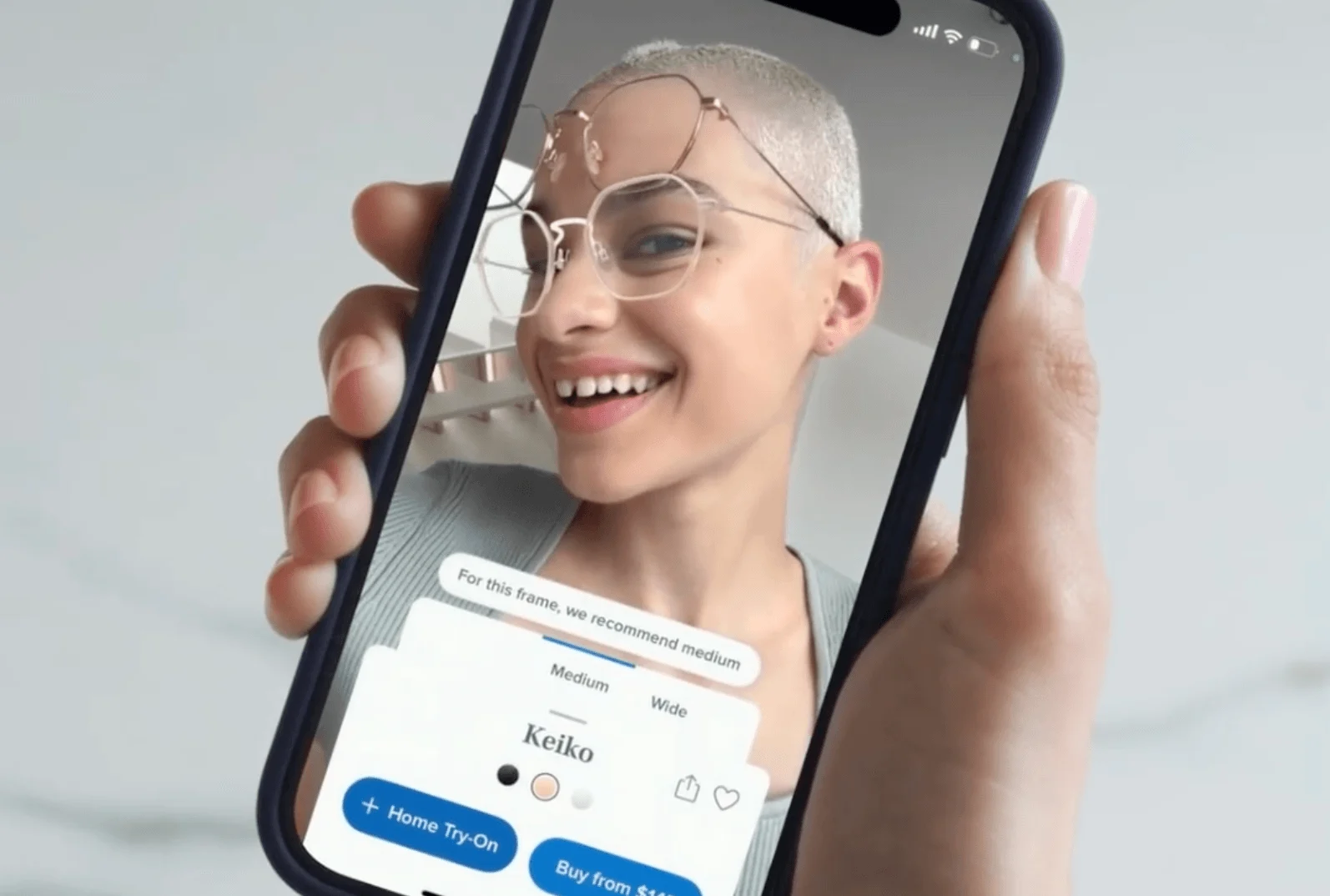
Virtual try-on lets shoppers see how a product looks on them, including products like glasses, makeup, jewelry, or clothing, using their device camera. The shopper gains confidence in fit and style before buying, which directly lifts conversion and cuts fit-related returns. This is the most mature category of AR product visualization; for the underlying tech, see BigCommerce's guide to 3D product visualization.
Preview placement (see it in your space).
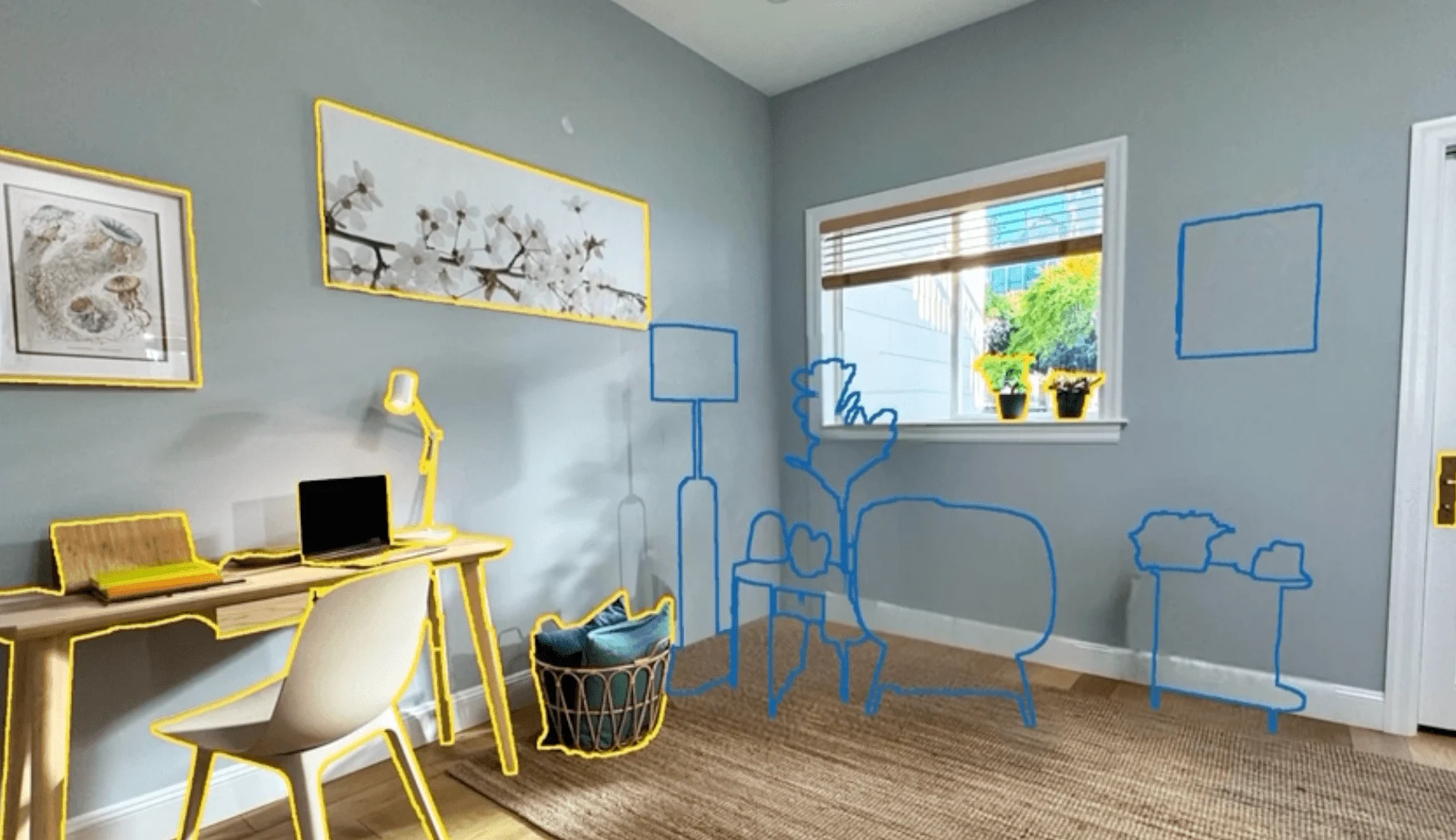
Placement AR lets shoppers position a true-to-scale 3D model of a product in their real environment. For furniture, décor, appliances, and art, the shopper resolves the biggest doubt of "will it fit and look right here?" before ordering, which is why this use case reduces returns so effectively.
Interactive user manuals.
AR manuals overlay step-by-step guidance onto a physical product, showing shoppers how to assemble, set up, or maintain it. The shopper gains a clearer, less frustrating post-purchase experience, which lowers support costs and boosts satisfaction and repeat purchases.
Social media AR filters.
Branded AR filters and lenses on platforms like Snapchat, Instagram, and TikTok let shoppers try products inside apps they already use, also known as social commerce. The shopper discovers and samples products in a shareable, low-friction way, which extends brand reach and turns try-on into organic marketing.
Real-world examples: Brands winning with AR
IKEA, Sephora, and Warby Parker all use AR to solve a specific buying doubt, including scale, shade, fit, or fabric, and each has made AR a standard part of its online shopping experience.
The strongest proof of AR's value is how established brands rely on it. Below are four documented examples.
IKEA Kreativ (furniture in your space): IKEA's app lets shoppers place true-to-scale 3D furniture in their homes using markerless AR. Shoppers confirm that a piece fits and suits the room before ordering, directly addressing the fit uncertainty that drives most furniture returns.
Sephora/L'Oréal Virtual Artist (beauty try-on): Sephora's Virtual Artist, powered by L'Oréal's ModiFace technology, lets shoppers test makeup shades in real time on their own face. Sephora has reported that shoppers who use the feature are about 2.5 times more likely to purchase. ModiFace now powers AR try-on for dozens of beauty brands worldwide.
Warby Parker/Lenskart (eyewear try-on): Warby Parker pioneered virtual eyewear try-on using Apple's ARKit and TrueDepth face mapping, and the approach is now standard across eyewear, with brands like Lenskart and Ray-Ban offering similar experiences. Shoppers see how frames sit on their face before buying, removing the hesitation that once kept eyewear purchases in stores.
How AR can help grow your store
AR grows a store four ways: it deepens engagement, reaches new customers, reduces returns, and lifts conversions and average order value.
Augmented reality shopping is not just a novelty; it maps to concrete business outcomes. Here's how.
Increase customer engagement.
AR turns passive browsing into active interaction, so shoppers spend more time with products and explore more options. Longer, richer sessions correlate with higher purchase intent and stronger brand recall.
Reach new customers.
Shareable AR filters and WebAR links spread through social platforms and messaging, putting products in front of shoppers who never visited your site. This organic reach is especially strong with younger, mobile-first audiences.
Create personalized shopping experiences.
With augmented reality at your fingertips, shoppers can see and imagine products before they buy, leading to more engagement and higher-intent shopping decisions (hey, doesn’t that also contribute to higher engagement rates?). These personalized shopping experiences put consumers in control, reducing buying objections and increasing confidence in their purchase decisions.
Reduce returns.
AR reduces returns by letting shoppers confirm fit, scale, and appearance before they buy, so fewer items come back. Reported reductions range from roughly 25% to 48% depending on category, which protects margins and cuts logistics costs. This ties directly to the returns and conversion rate optimization levers most stores are already working on.
Boost conversions and average order value.
Shoppers who can visualize a product buy more confidently and add more to cart, lifting both conversion and average order value when buying from virtual stores. Try-on and placement experiences consistently move shoppers who would otherwise hesitate, which is why AR pays off most in high-consideration and fit-heavy categories.
How to bring augmented reality to your ecommerce store
Adding AR is a four-step process: define objectives, choose your approach and tools, decide build vs. buy, then launch and market the immersive experience.
Follow these steps in order. Each ends with a concrete output before you move on.
Clarify your business objectives: Decide what problem AR should solve — reducing returns in one category, higher conversion rates on a key product line, or driving social engagement. Pick a single high-friction category to pilot rather than rolling AR across your whole catalog. Output: one clearly defined pilot goal and target category.
Choose your AR approach and tools: Decide between a native app and WebAR (browser-based, no download. Usually the lower-friction choice for visual commerce). Confirm device coverage: ARKit powers iOS, ARCore powers Android, and WebAR spans both. You'll also need 3D models of your products, either created in-house or by a vendor. Output: a chosen delivery method and a plan for producing 3D assets.
Build or buy: apps and platforms: Most merchants buy rather than build. On the BigCommerce app marketplace, options such as levAR AR & 3D Product Viewer, ARitize 3D, and Sayduck offer AR and 3D viewers you can add without custom development (presented as examples, not endorsements). When comparing tools, weigh license type, supported devices and operating systems, and capabilities. BigCommerce's headless commerce and API-first setup makes integrating AR and 3D viewers more flexible. Output: a shortlisted tool or vendor with a clear integration path.
Launch and market your AR experience: Add the AR feature to your product pages, make it obvious with a clear "view in your space" or "try it on" prompt, and promote it across email, social, and on-site placements. Track conversion, engagement, and return rates against your pilot goal. Output: a live AR experience and a measurement plan to prove ROI.
The final word
Augmented reality in ecommerce has moved from novelty to a practical tool that recreates in-store confidence online, helping shoppers buy the right thing the first time while cutting returns and lifting conversion.
To act on it, take three concrete steps. First, pick one high-friction product category (the one with the most returns or the most fit and scale uncertainty) to pilot. Second, choose a delivery approach, defaulting to WebAR for the lowest friction. Third, trial an AR app from the BigCommerce marketplace or brief a 3D-model vendor to produce your first assets.
AR rewards focus over scale. A single well-executed try-on or placement experience on your highest-consideration products will teach you more than a broad, shallow rollout. Explore BigCommerce's AR and 3D apps, or start a free trial, to put your first product in your shoppers' hands.
Augmented reality in ecommerce FAQs
Augmented reality is technology that overlays digital content (such as 3D models or information) onto a live view of the real world through a device camera. It keeps your real surroundings visible and adds digital elements on top in real time. In ecommerce, it lets shoppers preview products in their own space or on themselves.
AR adds digital elements to your real environment, while VR replaces your environment entirely with a simulated one. AR runs on standard smartphones, whereas VR needs a dedicated headset. For ecommerce, AR is more accessible because most shoppers already own an AR-capable phone.
Yes, more than 100 million consumers used AR shopping features in 2025, with adoption strongest among Gen Z and Millennial shoppers. Around 75% of shoppers say AR helps them discover and assess products. Adoption continues to climb as WebAR removes the app-download barrier.
The five main types are marker-based AR, markerless AR, location-based AR, projection-based AR, and WebAR. Markerless AR powers most in-space product previews, and WebAR runs in a browser with no app download. For ecommerce, markerless AR and WebAR are the most widely used.
Virtual try-on uses your device camera and face- or body-tracking to overlay a product, such as glasses, makeup, jewelry, or clothing, onto your live image. Software anchors the item accurately and adjusts it as you move. This lets shoppers judge fit and style before buying, acting as a virtual fitting room, which lifts conversion and reduces fit-related returns.
AR reduces returns by letting shoppers confirm fit, scale, and appearance before purchase, so fewer items come back, with reported reductions of roughly 25% to 48% by category. It lifts conversion by giving hesitant shoppers the confidence to buy, with reported lifts around 20% to 40%. The effect is strongest in fit-heavy and high-consideration categories.
WebAR is augmented reality that runs directly in a mobile web browser, so shoppers do not need to download an app. They tap a link or button on a product page and view the item in their space instantly. This lower friction makes WebAR one of the most effective ways for merchants to add AR.
Costs vary widely by approach. Off-the-shelf AR apps and 3D viewers from an app marketplace can start in the low hundreds of dollars per month, while custom builds and large 3D-model libraries run much higher. The biggest recurring cost is usually producing accurate 3D models of your products, so piloting one category first keeps initial spend contained.
Start by picking one high-friction product category — the one with the most returns or the most fit and scale uncertainty — to pilot. Define a single clear goal, such as reducing returns or lifting conversion on that line. From there, choose a WebAR or app-based approach and trial a tool before scaling.
Get a free 15-day trial of BigCommerce.
No credit cards. No commitment. Explore at your own pace.