Start & build


Launch Services
Overview
Chart your path to success with specialized services.Implementation Project Management
Experts to ensure you launch on time and under budget.Solution Architecture
Seasoned advisors to help you best design your store.Data Migration & Optimization
Expertise on a clean and clear path to migrating your data.Enterprise Launch Package
Personal training on how to set up and launch your BigCommerce Store.

Professional Services Blog Series
Get to know our teams and how they support your success in this Q&A series.


Pick one from each, pay one price: Introducing Set-Price Combos

Create your store and start selling today.
Create your new website.
See if the BigCommerce platform is a good fit for your business.
No credit card required.

Written by
Just Way Koay11/02/2026
Key highlights
With the new BigCommerce Set-Price Combos feature, easily offer one item from each of several product groups for one simple price.
Set-Price Combos let you define each group by individual products, a category, or a brand, with two to five groups in a single combo.
The discount only ever brings the price down, and it lands on the items shoppers expect it to.
Stay in control of exactly what each group contains, and of how often a combo applies in a single cart.
The deal shoppers already understand
A sandwich, a snack, and a drink for one price. A cleanser, a serum, and a moisturizer as a routine. Shoppers grasp these offers instantly. Yet building one has meant either creating a separate product for every possible combination, or using a fixed-price offer that draws from a single pool of items, with no guarantee of one of each.
That is why we have introduced Set-Price Combos within BigCommerce, a mix-and-match deal with one of each built in. You can now set one price for a combo made up of items from two to five different groups, and BigCommerce makes sure the cart holds everything the combo needs before the price applies.
One group or several? Know the difference
BigCommerce already lets you sell a set from one group for a fixed price. Set-Price Combos work differently, and it helps to know which to reach for.
Think of your promotions like the meal deal fridge at a lunch counter:
A single-group set is "any 2 sandwiches for $8." Shoppers fill the deal from one shelf, and any mix from that shelf counts.
A Combo item is one shelf in the meal deal, such as the sandwiches, the snacks, or the drinks.
A combo is the sign on the fridge that reads one from each shelf, one price.
In other words, a single-group set asks "how many from this group?" while a combo asks "is there one from every group?" Reach for a set when you want shoppers to buy more of one thing, and a combo when you want them to buy things that go together.
Why Set-Price Combos matter
Set-Price Combos turn a familiar retail offer into a single, low-maintenance promotion. There are a number of benefits that follow as a result:
Every pairing, covered.
Because each group can be a whole category or brand, a single combo covers every pairing your catalog allows. No more creating, and maintaining, a product for each combination.
And as your catalog changes, the combo keeps up. A serum added to your Serums category next month joins the offer the moment it's live.
The deal lands where shoppers expect.
When an item in the cart could fit more than one group, BigCommerce works out the arrangement that completes the combo rather than giving up on the first try. Where several items could fill the same group, it uses the highest-priced one, so the shopper gets the bigger saving.
So shoppers who add the right items get the advertised price, without you predicting every possible cart.
Only ever a saving.
A combo applies only when the items it matches cost more together than your set price. If they already cost less, the combo steps aside, so it can never raise what a shopper pays.
When it does apply, each matched item carries part of the saving, so every line on the order reflects what the shopper actually paid for that item.
Ready for headless storefronts.
Set-Price Combos are available through the Promotions API as well as the control panel, so headless and API-driven teams can build them too.
How it works
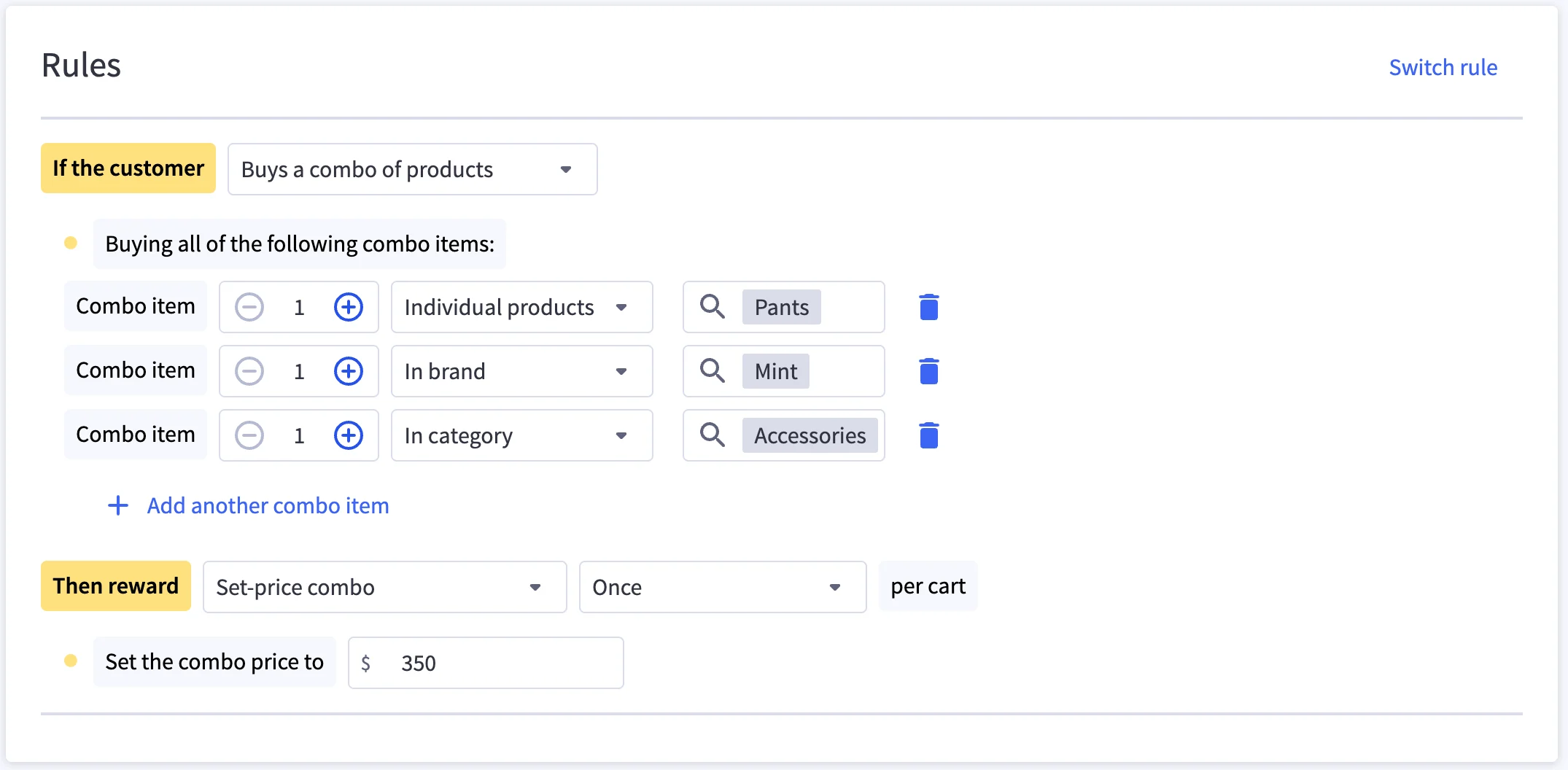
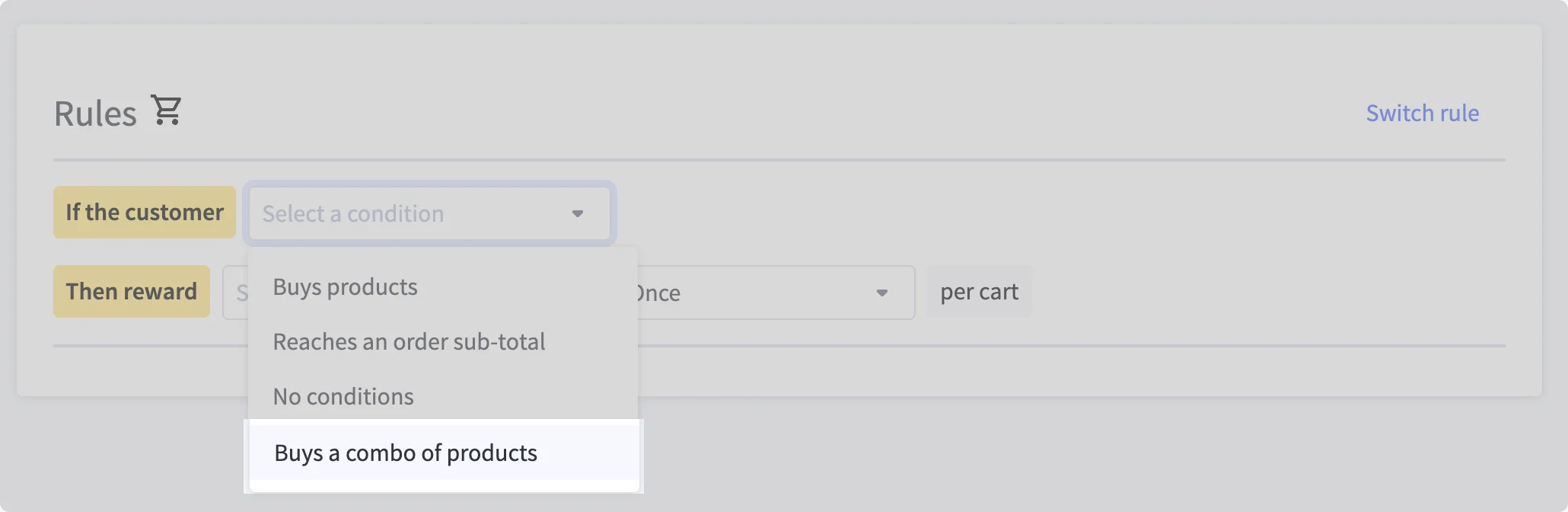
Set-Price Combos live in the Rules editor you already use. Add a rule and choose Buys a combo of products under "If the customer," then add between two and five Combo item rows. For each row, set a quantity and choose whether it matches Individual products, products In category, or products In brand.
Under "Then reward," Set-price combo is selected for you, and you enter the price in Set the combo price to.
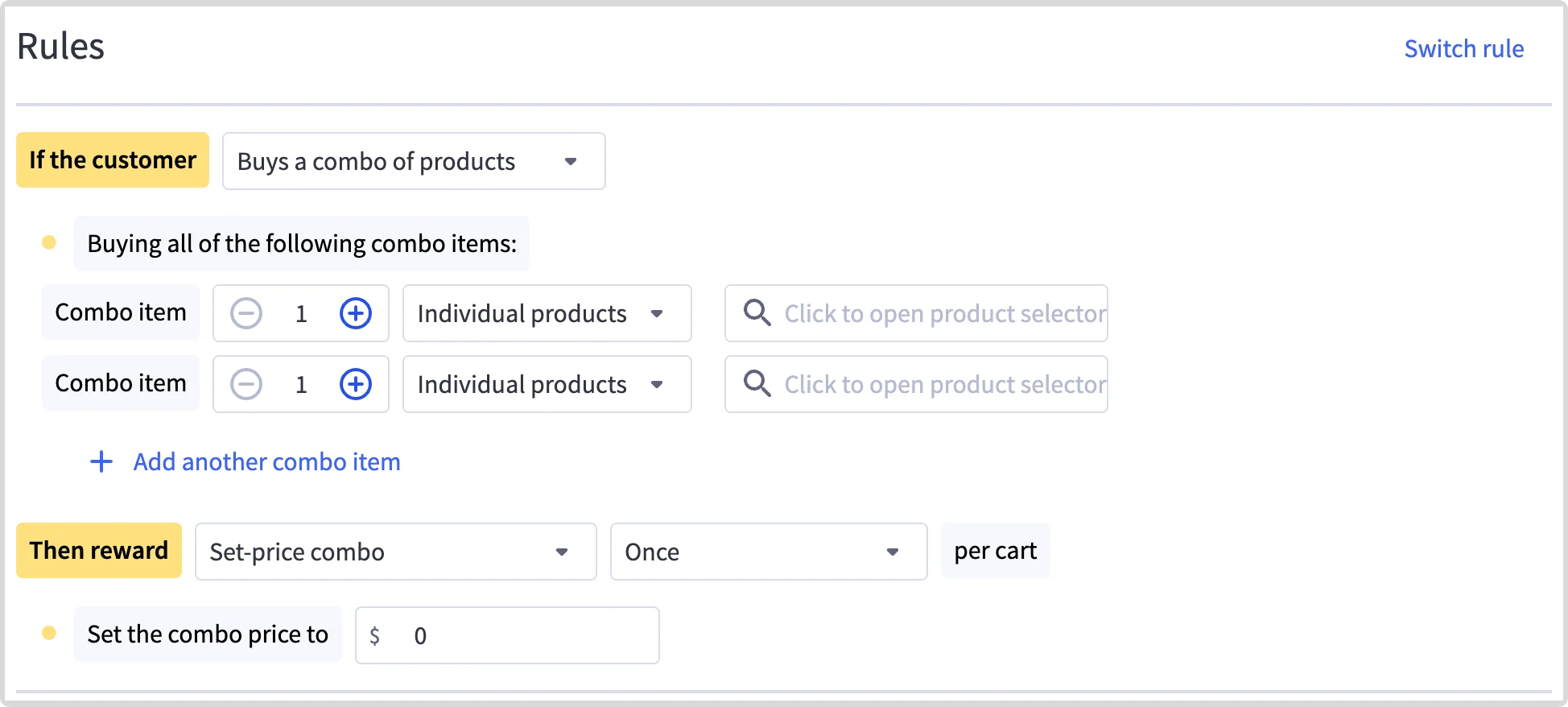
Each setting controls one part of the offer, as the table below shows.
Configuration | What It Controls | Example |
Combo item | One group the shopper picks from, defined by individual products, a category, or a brand. Add two to five. | Any product in your Cleansers category. |
Quantity | How many items from that group the combo needs, from one to five. | Two of any sheet masks. |
Set the combo price to | The total the matched items cost together. | $60 for a cleanser, a serum, and a moisturizer. |
Once or Unlimited times per cart | Whether the combo applies once per cart, or again for every complete set in the cart. | Unlimited, so a shopper buying two full routines pays $60 for each. |
At checkout, the saving spreads across the matched items in proportion to their prices. Say a shopper picks a $25 cleanser, a $30 serum, and a $20 moisturizer, which come to $75. With a $60 combo price, each item comes down by the same 20%, to $20, $24, and $16.
Sample use cases
Meal deals are the classic example, but combos suit any offer built from complementary items, including those below.
Use Case | Setup | Outcome |
Complete routine | Any cleanser, any serum, and any moisturizer, each by category, for $60. | Shoppers build a routine from your full range, and new arrivals join the offer automatically. |
Beginner kit | Any acoustic guitar, any strap, and any pack of strings, each by category, for $199. | First-time buyers get everything they need to start playing in one checkout. |
Holiday gift trio | A candle, a hand cream, and a lip balm for $45 from December 1, set to Unlimited times per cart. | Gift buyers mix scents freely and get the price on every trio they add. |
Stock-up deal | Two boxes of any protein bar from your house brand, plus any shaker, for $50. | Quantity per Combo item rewards larger baskets without a separate volume discount. |
Planning your featured promotions
A few behaviors to keep in mind as you design your first combos:
One item, one group. Each item in the cart fills one Combo item at most. A product that fits two of your groups still needs a second qualifying item to fill both.
Sale items count. An item at a sale price can fill a Combo item, and the combo works from that sale price. There's no option to leave sale items out, so set your combo price with that in mind.
Products include their variants. Choosing a product includes all of its variants, so a blue XL shirt counts toward a "shirt" Combo item. Combo items target whole products rather than individual variants.
Earlier discounts carry through. An item discounted by a promotion that runs before the combo still counts toward it, and the combo works from that item's discounted price.
Overlapping combos can both apply. If two combo promotions share a product, one cart item can count toward both. The second combo works from the price left after the first, so it only applies if those items still cost more than its set price. If you run several combos at once, keep their groups separate or test how they combine before launch.
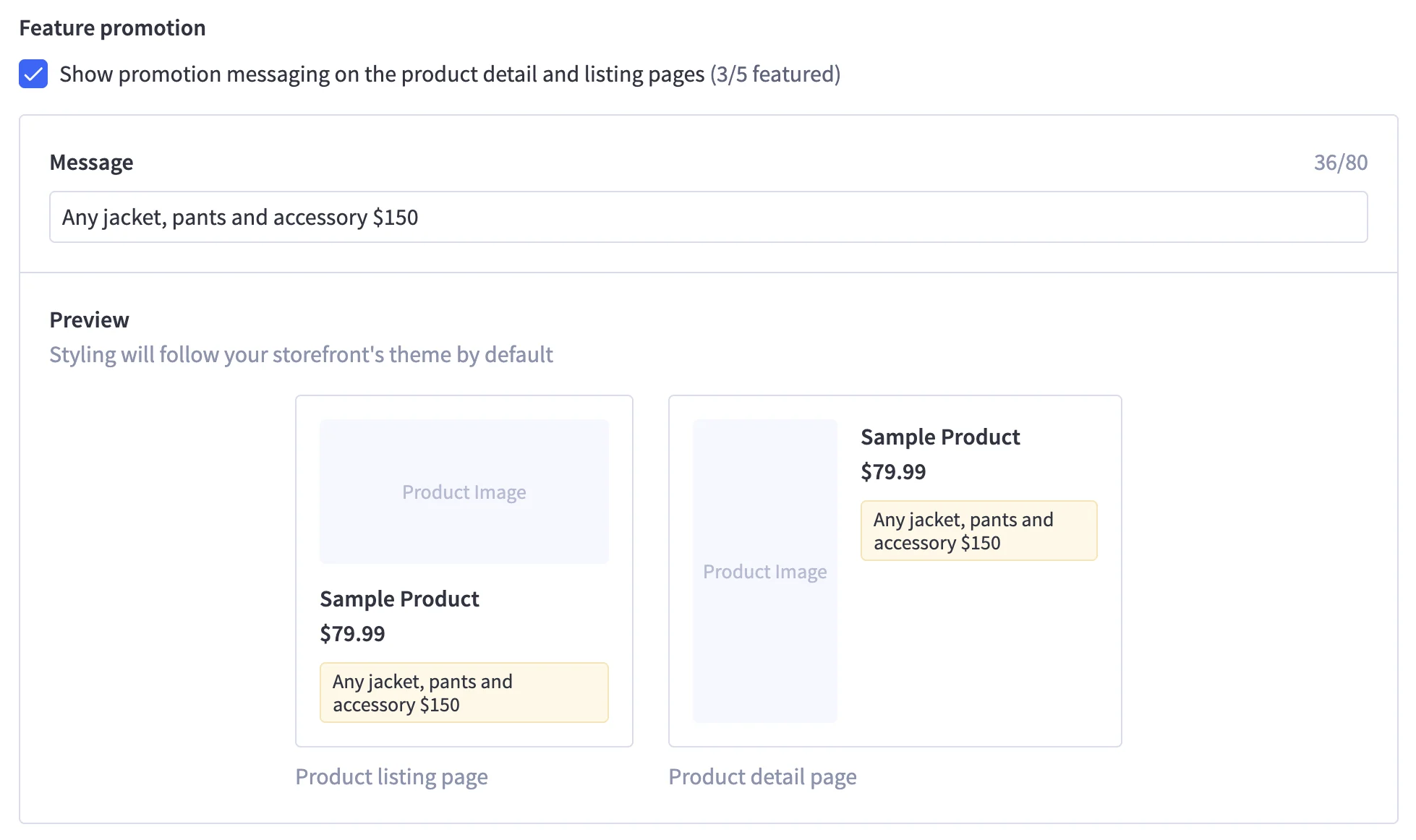
Complete sets only. A partly filled combo gets no discount. To nudge shoppers toward the last item, feature the promotion so its message shows on your product listing and detail pages. Featuring is available for automatic combos on storefronts set up for featured promotions.
The final word
Set-Price Combos bring the meal deal sign to your storefront. Shoppers pick one from each shelf, the price is the one you advertised, and you manage it all from a single promotion.
Choose your groups, set your price, and let BigCommerce take care of matching the cart.
See Automatic and Coupon Promotions in the Help Center to learn more about building combo rules.

Commerce built for momentum.
Get up to speed with new features that drive your business forward — from core capabilities to agentic commerce (and beyond).