Start & build


Launch Services
Overview
Chart your path to success with specialized services.Implementation Project Management
Experts to ensure you launch on time and under budget.Solution Architecture
Seasoned advisors to help you best design your store.Data Migration & Optimization
Expertise on a clean and clear path to migrating your data.Enterprise Launch Package
Personal training on how to set up and launch your BigCommerce Store.

Professional Services Blog Series
Get to know our teams and how they support your success in this Q&A series.


Retire a promotion today, bring it back next season: Introducing Archive Promotions

Create your store and start selling today.
Create your new website.
See if the BigCommerce platform is a good fit for your business.
No credit card required.

Written by
Just Way Koay07/23/2026
Retire a promotion today, bring it back next season: Introducing Archive Promotions
Get The Print Version
Tired of scrolling? Download a PDF version for easier offline reading and sharing with coworkers.
A link to download the PDF will arrive in your inbox shortly.
Key highlights
With the new BigCommerce Archive Promotions feature, easily archive finished promotions to move them out of your main list without deleting them, and restore them at any time.
Archive Promotions makes it easy to clean up years of past campaigns in one go with bulk archiving.
Restored promotions always return deactivated, so an old offer can never go live by accident.
Keep a faithful, read-only record of past offers in a dedicated Archived view.
Out of the way, not out of reach
Every store's promotions list grows. Season after season, campaign after campaign, the list fills with offers that have done their job. And until now you had two blunt options for dealing with them: leave them cluttering the list indefinitely, or delete them permanently and lose the record for good.
That is why we have introduced Archive Promotions within BigCommerce, the middle path between keeping and deleting. You can now archive a promotion, which deactivates and moves it out of your main list into a dedicated Archived view, available to be restored at any time.
Archive or delete? Know the difference
Promotions can quickly pile up and result in a bunch of digital clutter. The new ability to archive can help, but first, it’s important to understand how this functionality differs from simply deleting a promotion.
Think of your promotions like kids' toys:
An active promotion is the toy being played with right now.
An inactive promotion has been put down, but it's still lying around the playroom, ready to be picked up again.
An archived promotion has been packed into the toy box or up to the attic — still yours, still retrievable, just not needed soon and not clogging up the floor.
A deleted promotion is the toy the kids have outgrown: donated or disposed of, and not coming back.
In other words, archiving is reversible retirement: an archived promotion stops applying, steps out of your main list, and waits in the Archived view until you restore or remove it. Deleting is permanent, removing the promotion along with its configuration from the system forever.
Why Archive Promotions functionality matters
Archive Promotions turns list management from a destructive chore into safe housekeeping. There are a number of benefits that follow as a result:
A cleaner workspace.
By archiving promotions you no longer need in the moment, you’re essentially focusing your workspace. Once you’ve archived promotions, your main list shows only the promotions that matter now, which makes day-to-day management easier to reason about.
A safety net for retiring offers.
Retiring a promotion no longer requires the confidence of permanent deletion. If it turns out you need it back, it's only a few clicks away.
Without the ability to archive, it’s easy to hold onto offers you don’t need in the moment and may never need again, resulting in a workspace that’s cluttered and chaotic.
Your history, preserved.
Past offers remain on record exactly as they ran, providing a useful reference when teams are planning the next campaign or asking, "What did we run last year?"
This is also helpful if you bring someone new onto the team, as they can look through previous offers and get a feel for what’s worked, what hasn’t, and which trails haven’t been blazed at all.
Rebuild nothing.
The right promotions are critical to any annual campaign. Yet, leaving annual campaign offers in your workspace all year, until they’re needed, results in bloat.
With the Archive Promotions feature, annual campaigns can be restored rather than recreated from scratch, with all their rules intact. When the campaign is over? You can just archive them until next year.
How it works
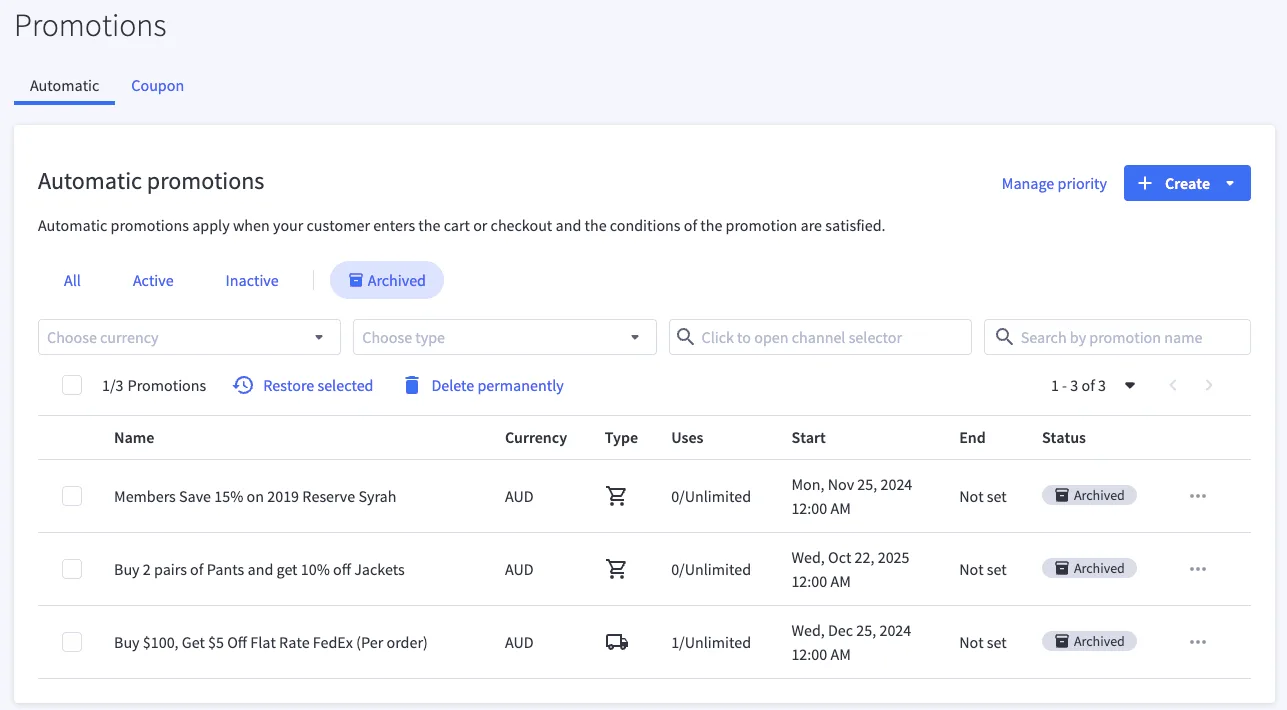
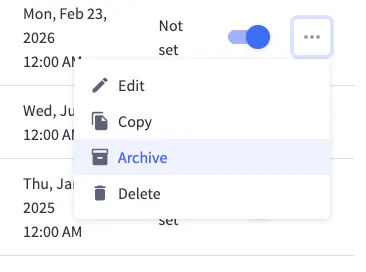

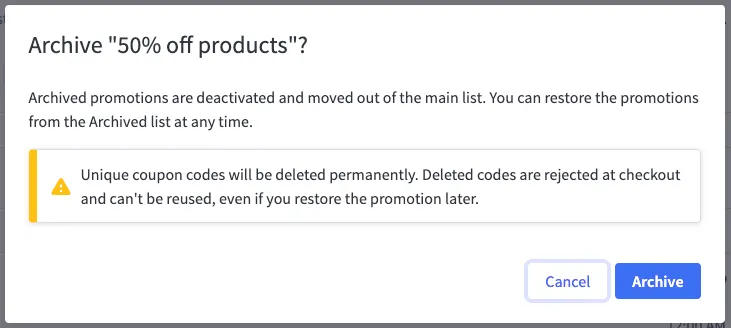
On the Promotions list, each promotion's action menu now includes Archive alongside Edit, Copy, and Delete. Choose Archive, confirm, and the promotion moves to the new Archived filter, which sits right beside your existing All, Active, and Inactive filters.
Archiving also works as a bulk action: select any number of promotions with the row checkboxes and archive them in one go.
Action | What it Does | Where to Find it |
|---|---|---|
Archive | Deactivates the promotion and moves it out of the main list into the Archived view. | Row action menu or bulk action bar on the Promotions list. |
Restore | Returns the promotion to your main list, deactivated and ready for review | Archived view. |
Delete | Removes the promotion for good, with the usual "this can't be undone" confirmation. | Promotions list and Archived view. |
The Archived view is your promotions history, kept safely out of the way. And to make it easy to navigate, each archived promotion shows an Archived badge.
Sample use cases
Annual campaigns aren’t the only instance where you might need to archive a promotion. There are numerous use cases, including some of those found below.
Use Case | Setup | Outcome |
|---|---|---|
End-of-season cleanup | Bulk-archive the whole summer campaign once it wraps. | The main list returns to showing only live and upcoming offers. |
Annual events | Archive your Black Friday promotion in December; restore it next November. | The campaign comes back with rules intact, deactivated for review before launch. |
Post-launch housekeeping | Archive test and draft promotions after go-live. | The record of what was tried survives without cluttering the workspace. |
Deliberate deletion | Archive first; delete permanently from the Archived view once you're certain. | A natural cooling-off step before irreversible cleanup. |
Planning your archived promotions
A few behaviors worth knowing as you fold archiving into your routine:
Restored means reviewed. Restored promotions always return deactivated, so an old offer can never go live by accident. Enabling it is always your explicit call.
Restore first to rework. Archived promotions are read-only, which keeps them a faithful record. To edit or copy one, restore it first.

Coupon promotions: plan for fresh codes. Archiving a coupon promotion permanently removes its unique coupon codes, and they can't be reused even after the promotion is restored. If a coupon campaign might run again, factor generating new codes into the plan.
Priority stays focused. The Manage Priority page only ever shows promotions that could actually apply. Archived promotions are excluded automatically, no tidying required.
The final word
The Archive Promotions functionality gives your promotions list the shape it should have had all along: current campaigns front and center, history safe in the toy box and always only a few clicks from coming back.
Archive what's finished, restore what's returning, and save deletion for the offers you've truly outgrown.
See Automatic and Coupon Promotions in the Help Center to learn more about Archiving Promotions.

Find your favorite features.
Explore all of the capabilities of the BigCommerce platform.