Start & build


Launch Services
Overview
Chart your path to success with specialized services.Implementation Project Management
Experts to ensure you launch on time and under budget.Solution Architecture
Seasoned advisors to help you best design your store.Data Migration & Optimization
Expertise on a clean and clear path to migrating your data.Enterprise Launch Package
Personal training on how to set up and launch your BigCommerce Store.

Professional Services Blog Series
Get to know our teams and how they support your success in this Q&A series.


Bulk Coupon Management: Create Codes or Bring Your Own

Create your store and start selling today.
Create your new website.
See if the BigCommerce platform is a good fit for your business.
No credit card required.

Written by
Just Way Koay11/01/2026
Bulk Coupon Management: Create Codes or Bring Your Own
Get The Print Version
Tired of scrolling? Download a PDF version for easier offline reading and sharing with coworkers.
A link to download the PDF will arrive in your inbox shortly.
Create codes at scale or bring your own: Introducing Bulk Coupon Management, now with import
Key highlights
With BigCommerce Bulk Coupon Management, generate thousands of unique coupon codes in your own format, or import the codes you already have, all inside a single promotion.
Bulk Coupon Management keeps every code together, so you can add batches, revoke codes, and see the orders behind each one without recreating promotions.
Every code follows its promotion's discount rules, and import files are checked in full before a single code is added.
Track redemptions code by code across channels, affiliates, and campaigns.
One promotion, thousands of codes
Coupon promotions are one of the most effective tools for targeted marketing, but managing them one code at a time creates a bottleneck. An affiliate program, a loyalty campaign, or a seasonal push across several channels can each call for thousands of unique codes. And many of those codes don't start in BigCommerce at all. Your email platform may create one for every new subscriber, your loyalty program may issue its own, and your shoppers may still be holding codes from the platform you moved from.
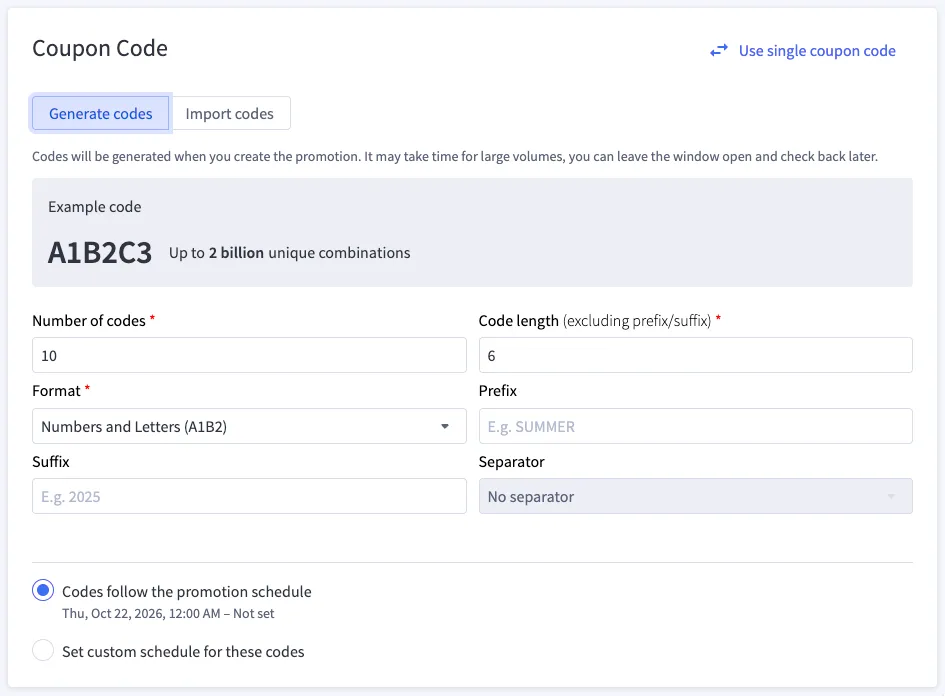
That is why we have introduced Bulk Coupon Management within BigCommerce, a single home for coupon codes at scale. You can now generate unique codes in bulk or import codes you've already created elsewhere, then manage every one of them from the promotion they belong to.
Generate or import? Know the difference
Both paths end with a promotion holding many unique codes that share one set of discount rules. What differs is where the codes come from, and that decides which path to take.
Think of your promotion like a lock, and each coupon code like a key:
Generating codes is having a fresh set of keys cut to your pattern. BigCommerce creates them in the format you choose, and you decide who gets them.
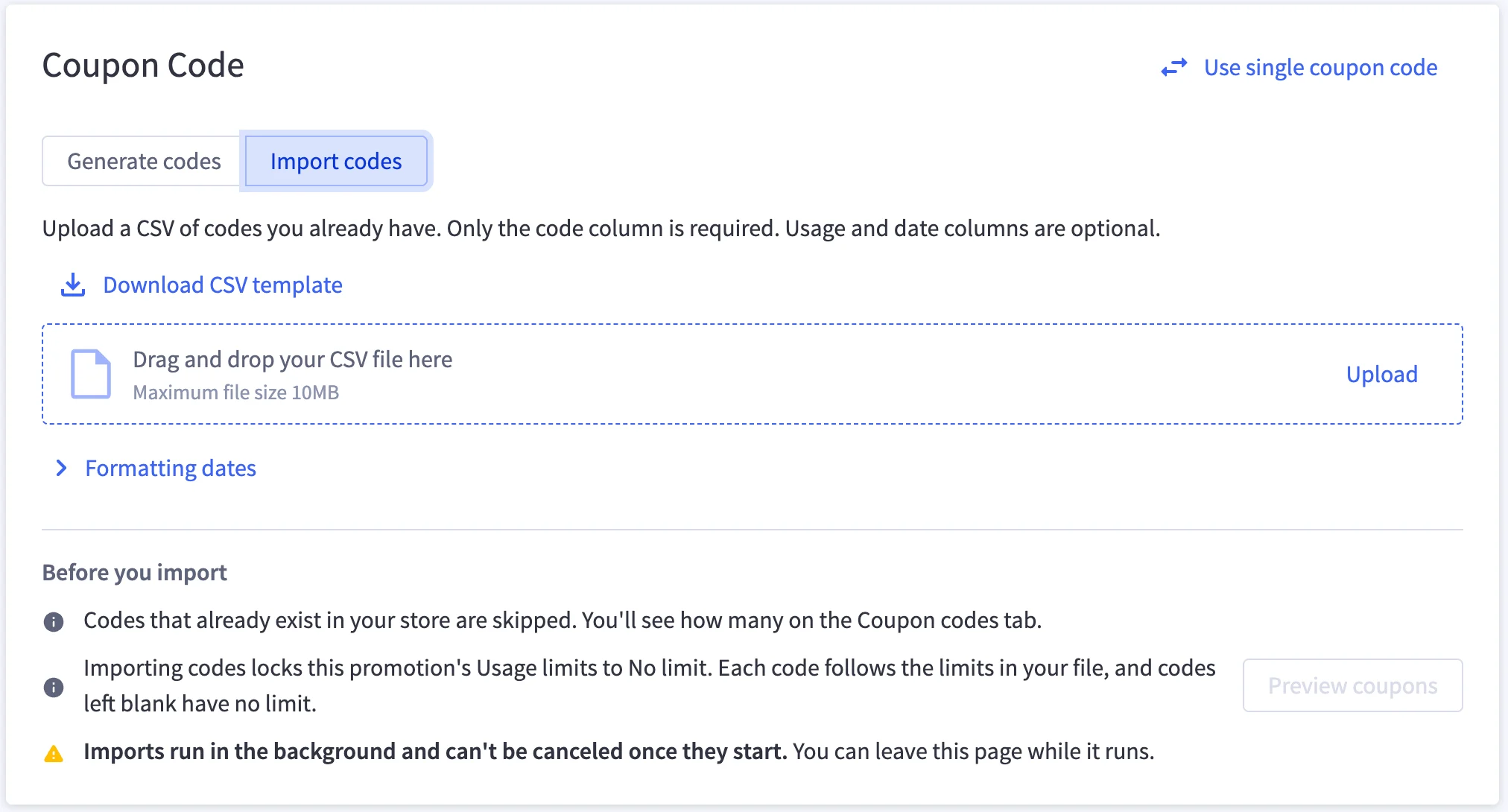
Importing codes is fitting the lock to keys that are already out there. They may already be sitting in your shoppers' inboxes, and the import makes sure they open the door at checkout.
In other words, generate when you want BigCommerce to create the codes, and import when another system already has. Many promotions will hold both.
Why Bulk Coupon Management matters
Bulk Coupon Management turns one-size-fits-all discounts into targeted, trackable campaigns, however your codes are made. There are a number of benefits that follow as a result:
Personal offers, without the busywork.
Generate thousands of codes for email campaigns, loyalty rewards, or account registration incentives. Give every shopper their own code, which cuts down on sharing and misuse.
If your email platform like Klaviyo or Mailchimp already creates a code per subscriber, import those directly with minimal fuss. Either way, nobody types codes in one at a time.
Your codes, wherever they started.
Your CRM, email, or loyalty platform can stay the source of your codes. Bring them into BigCommerce in one upload, and the codes your shoppers have already received work at checkout, with redemptions tracked alongside the rest of your promotions.
Your other tools keep doing what they do best, and your store honors what they send.
Checked before it counts.
Every import file is validated in full before a single code is added. A missing code, a code with characters that aren't allowed, or a malformed date stops the whole upload, and you'll see up to 20 rows with problems at once so you can fix them in a single pass.
That means you're never left reconciling a campaign that is only half loaded.
Every channel, measured.
Assign unique codes to marketing channels, affiliates, or influencers, and each code's usage is tracked on its own. A prefix like IG- or META- on a generated batch makes the source obvious at a glance, and imported partner codes are tracked the same way.
Because every code lives in the same promotion, seeing which channels convert means reading one list rather than reconciling several.
Control that scales with you.
Set usage limits once on the promotion to cap total redemptions, or to limit how often each code and each shopper can redeem, and every generated code follows them. Imported codes bring their own limits instead, set row by row in your file, so a loyalty code can allow one use while a partner code allows a hundred. Individual codes can still have their own redemption window when one offer needs to start later or end sooner.
And when a code needs attention, search for it, revoke it, or check the orders it was used on, all without touching the rest of the campaign.
How it works
Bulk codes live inside a coupon promotion and inherit all of its discount rules, targeting, and scheduling. In the promotion editor, switch the coupon code section to bulk and choose Generate codes or Import codes. On an existing promotion, both options sit in the Add codes menu on the Coupon codes tab, so you can keep adding batches either way and mix generated and imported codes in the same promotion.
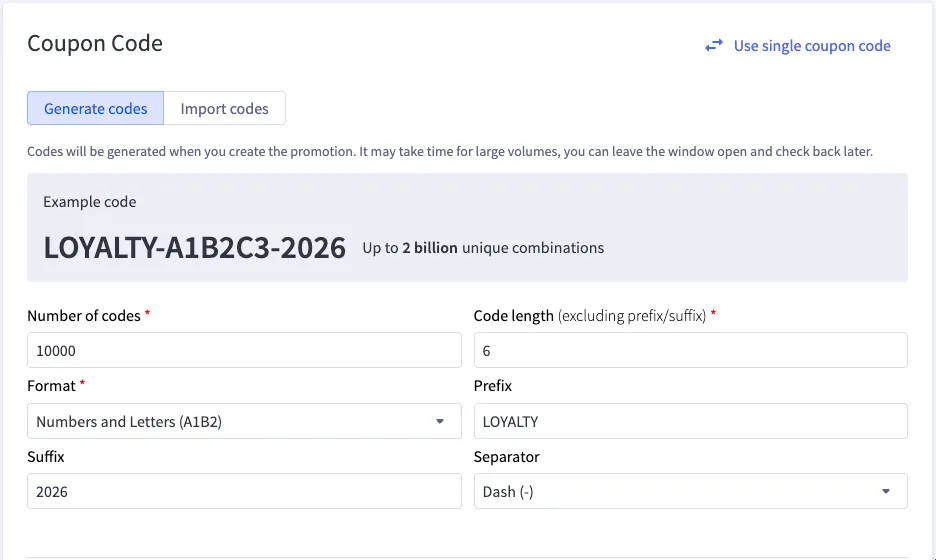
The two paths ask for different things, as the comparison below shows.
Generate codes | Import codes | |
|---|---|---|
Where the codes come from | BigCommerce creates them to your pattern. | A CSV file of codes you already have, built from the template in the import panel. |
How many at once | Up to 10,000 per batch. | Files up to 10MB, which typically holds well over 100,000 codes. |
What you set | Code length (6 to 16 characters), format (numbers, letters, or both), and an optional prefix, suffix, and separator. | The code itself, which is the only cell you must fill in, plus optional usage limits per code with |
Example | LOYALTY-A1B2C3-2026 | WELCOME-7Q2KX, exactly as your email platform sent it. |
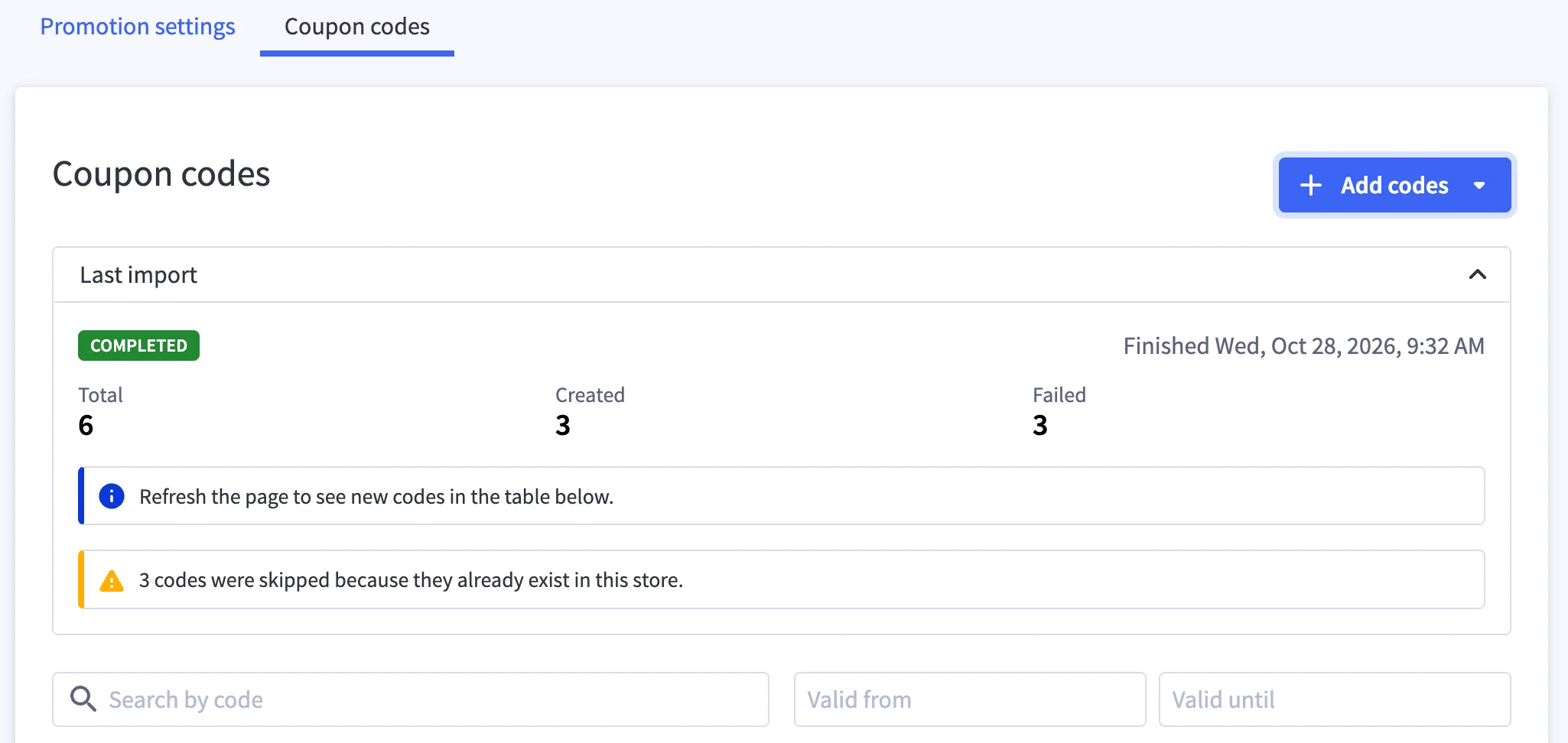
While it runs | Codes are created while a progress bar tracks the batch. | The import runs in the background, so you can leave the page. The promotions list marks the promotion until it's done. |
When it's done | Download the new codes as a CSV file immediately after generation to hand out through your marketing tools. | The Coupon codes tab shows how many codes were added and how many weren't. |
Redemption windows set in an import file must sit within the promotion's own dates, in your store's time zone, and codes without one simply follow the promotion's schedule. Developers can run the same import through the Promotions API, with files up to 20MB.
Sample use cases
Generating suits campaigns that start in BigCommerce, and importing suits codes that already exist somewhere else. Plenty of programs need both.
Use Case | Setup | Outcome |
|---|---|---|
Influencer campaign | Generate 500 codes for 15% off with the prefix INFLUENCER- and give one to each creator. | Track and revoke individual creators' codes without duplicating promotions. |
Affiliate network distribution | $20 off with 10,000 generated alphanumeric codes. | Distribute codes at scale while maintaining one consistent promotion structure. |
Channel-based campaign | Generate a batch per channel for 10% off, with prefixes like IG-, META-, and WEB-. | Compare ad performance and return on spend across channels, code by code. |
Welcome series | Your email platform creates a unique code for every new subscriber. Import them into a 15% off promotion, with | Every code in the welcome email works at checkout, with redemptions tracked per code. |
Moving to BigCommerce | Export unused codes from your previous platform and import them into matching promotions before launch. | Shoppers' existing codes keep working from day one. |
Loyalty tiers | Import the member codes your loyalty platform issues, then generate a VIP- batch for your top tier in the same promotion. | One offer, two sources of codes, and a single view of how each tier redeems. |
Planning your bulk coupon promotions
A few behaviors worth knowing as you scale up your coupon codes:
Unique across the store. Every coupon code must be unique within your store, and matching ignores capitals, so SAVE10 and save10 count as the same code. If an imported code already exists in your store, or appears more than once in the file, the repeat isn't added and counts as failed, while the rest of the file still goes in. The check happens during the import, so the preview won't flag it.
One import at a time. Your store runs one import at a time, so start the next once the current one finishes. Generating codes stays available in the meantime.
A fresh redemption count. Imported codes start with no redemptions recorded, since usage from another system isn't carried over. A code that was partly used elsewhere starts with the full allowance set for it in your file, so lower its max_uses if earlier redemptions should count.
Check the file before you submit. Once an import starts, it runs to completion, and there's no one-step undo for a whole file. If the wrong file goes in, you can remove its codes in batches with bulk selection or set up a fresh promotion for the corrected file, so a quick look at the preview is worth the moment it takes.
Room to grow. To keep your store performing at its best, we recommend no more than 2 million codes per store, counting both generated and imported codes.
The final word
Bulk Coupon Management gives every coupon campaign one home. Whether the keys are freshly cut or already in your shoppers' pockets, they all open the same lock, and every redemption is tracked against the promotion they belong to.
Generate the codes you need, import the ones you already have, and see exactly how each one performs.
See Automatic and Coupon Promotions in the Help Center to learn more about bulk coupon codes.
There's a lot to love ❤️
Watch a demo to see the BigCommerce platform in action.