Start & build


Launch Services
Overview
Chart your path to success with specialized services.Implementation Project Management
Experts to ensure you launch on time and under budget.Solution Architecture
Seasoned advisors to help you best design your store.Data Migration & Optimization
Expertise on a clean and clear path to migrating your data.Enterprise Launch Package
Personal training on how to set up and launch your BigCommerce Store.

Professional Services Blog Series
Get to know our teams and how they support your success in this Q&A series.


Coupon Code Scheduling: Set When Codes Redeem

Create your store and start selling today.
Create your new website.
See if the BigCommerce platform is a good fit for your business.
No credit card required.

Written by
Just Way Koay09/15/2026
Coupon Code Scheduling: Set When Codes Redeem
Get The Print Version
Tired of scrolling? Download a PDF version for easier offline reading and sharing with coworkers.
A link to download the PDF will arrive in your inbox shortly.
Introducing Coupon Code Scheduling: Time Your Codes, Not Just Your Promotions
Key highlights:
Give any batch of coupon codes its own valid dates, with every code following the promotion's schedule by default.
Run one long-lived promotion while code batches launch in waves: seasonal drops, partner campaigns, and early-access windows each keep their own timetable.
Reschedule codes after they're distributed by editing one from its row menu, or by selecting a batch on the Coupon codes tab and changing them together.
Codes stay honest at checkout. A code redeems only while its promotion is active and inside its own window, and built-in validation keeps code and promotion dates aligned.
Every code on its own clock
A promotion has one schedule, and until now every coupon code lived and died by it. Codes generated in January expire with the promotion in December, whether they were printed on a spring gift insert or handed to a partner for a summer push. To stagger timing, merchants have had to clone the same offer into multiple promotions, one per window, or force a batch to expire early by cutting its usage limits. Both are workarounds standing in for a real schedule.
That is why we've introduced Coupon Code Scheduling within BigCommerce, giving each batch of codes its own window inside a single promotion. You can now set start and end dates on any batch of coupon codes. The fields arrive pre-filled with the promotion's schedule; adjust them, and one offer can serve many timetables.
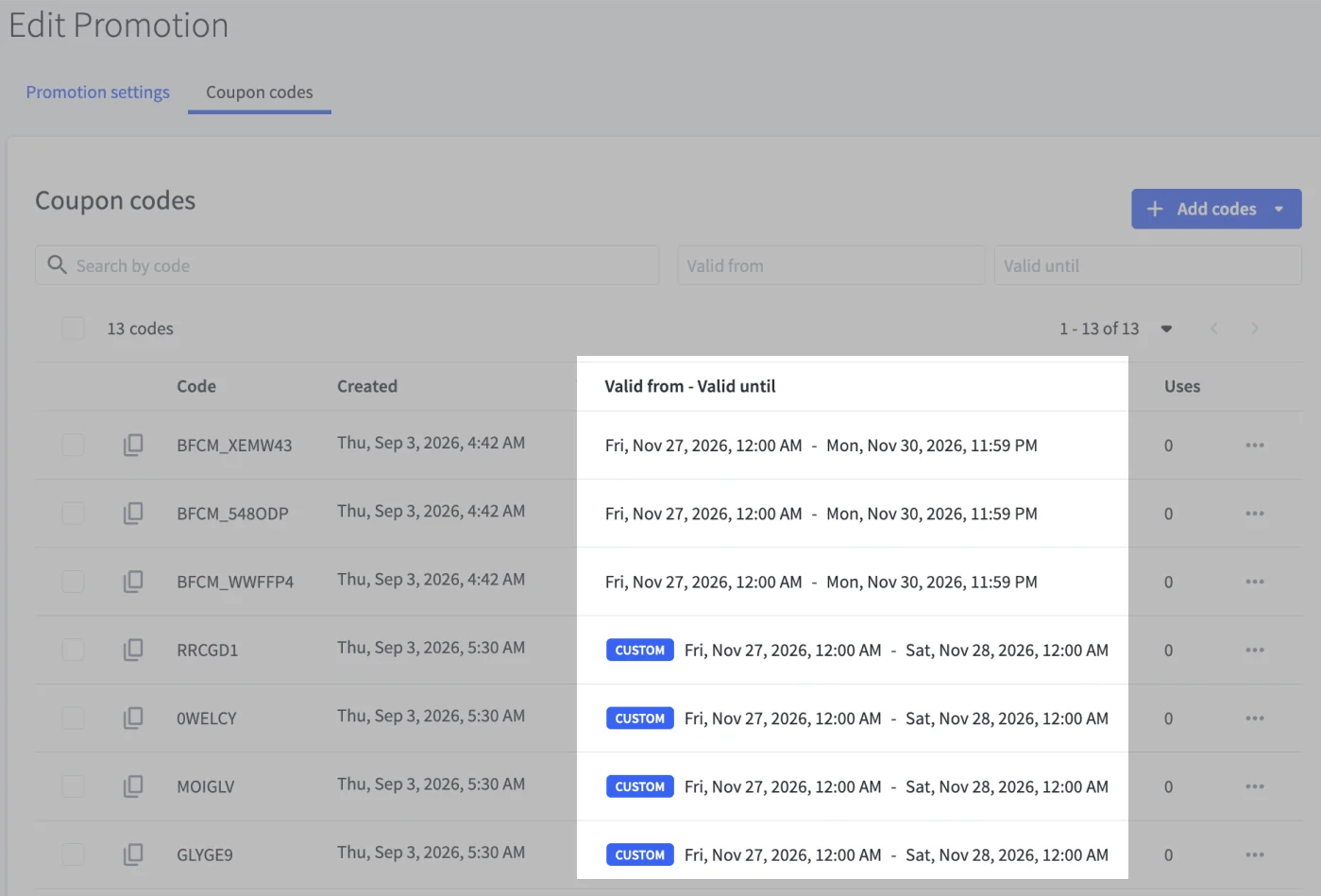
What does Coupon Code Scheduling in BigCommerce do?
Most codes never need their own dates, and that's the point. Before scheduling your first batch, it helps to understand the difference between a code that follows the promotion and one that runs on its own dates.
Think of your promotion like a festival:
A code that follows the promotion's schedule is a season pass, working whenever the festival gates are open, from opening day to closing night.
A code with a custom schedule is a day ticket, good only on the dates printed on it, and never valid when the festival itself is closed.
In practice, most codes simply follow the promotion's schedule, automatically and with nothing to set. Custom codes run on dates set explicitly for them when you generate the batch, and update if you need to edit it afterwards. A code either follows the promotion entirely or carries its own fully explicit window, never a mix of the two. Either way, a code redeems only while the promotion is active and inside the code's own window.
In other words, scheduling a code doesn't change what the offer is. It changes when that code can unlock it.
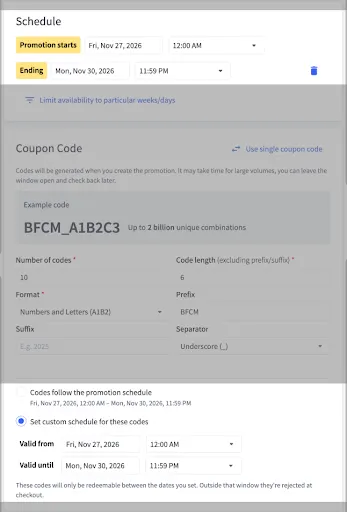
Why Coupon Code Scheduling matters
Coupon Code Scheduling turns code timing into a campaign tool rather than a fixed property of the promotion. Here’s the benefits:
Run staged campaigns from a single promotion.
One promotion can now power an entire calendar of code drops. Set the offer and rules once, then release batches whose windows match each moment. No cloned promotions to build, and no duplicate rules to keep aligned.
Picture a $15-off promotion that runs all year. The codes printed on your holiday gift inserts can be valid only from late November, while the batch for your spring mailer waits quietly for March.
Keep pace with partners and external systems.
Not every code strategy lives entirely inside BigCommerce. If you manage codes through a partner's platform, a print run, or an ERP that expects specific dates, custom windows let each batch match the calendar of the system or partner it belongs to, down to the day.
If a master code is synced with your ERP for a July campaign, its window in BigCommerce can mirror the ERP's dates, so what your systems promise is exactly what checkout honors.
Change course after codes are in the wild.
Schedules aren't locked in at generation. Adjust a single code from its row menu, or select a batch and move them together. Either change takes effect immediately at checkout, and choosing the follow-the-promotion option returns codes to the promotion's schedule just as easily.
When a batch outperforms and deserves another month, the extension is a quick schedule edit, not a new promotion.

Trust what happens at checkout.
The window a code carries is the window checkout enforced. Outside that window, a code is rejected the same way an expired one would be.
That predictability matters most at the edges. Expired batch codes from last season can't sneak through, and a code that promises July savings can't disappoint in June.
How it works
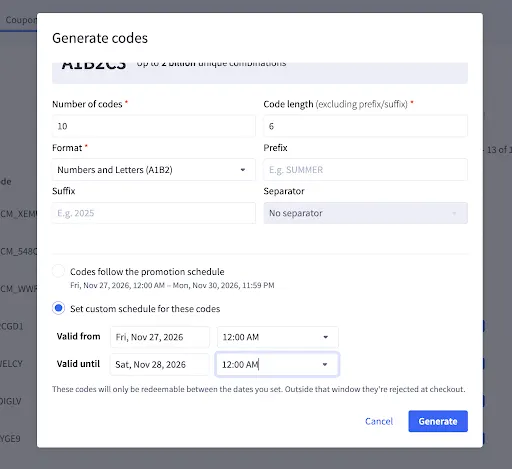
The primary home for scheduling is the Generate codes modal, where large batches are created. A schedule choice sits alongside the code options. Codes follow the promotion schedule. The default window shows the promotion's own window at a glance, while Set custom schedule for these codes reveals Valid from and Valid until fields pre-filled with the promotion's schedule. The same choice appears in the Coupon Code section when you create the promotion, so even the very first batch can carry its own window. For codes already distributed, Edit schedule handles changes, either per code from its row menu or in bulk across a selection of up to 250 codes at a time. All times display in your store's timezone.
Configuration | What It Does | Example |
Codes follow the promotion schedule | The default. The batch uses the promotion's dates, and there's nothing to set. | A promotion running Jan 1 – Dec 31 gives every code those same dates. |
Set custom schedule for these codes | Gives the batch its own Valid from and Valid until, pre-filled with the promotion's dates and ready to adjust. | The holiday batch carries Nov 27 – Dec 24 instead. |
Edit schedule | Changes dates on codes that already exist, one code or a selected batch at a time. Choosing the default option resets codes to the promotion's schedule. | Extend that holiday batch through Dec 31 when it earns the extra week. |
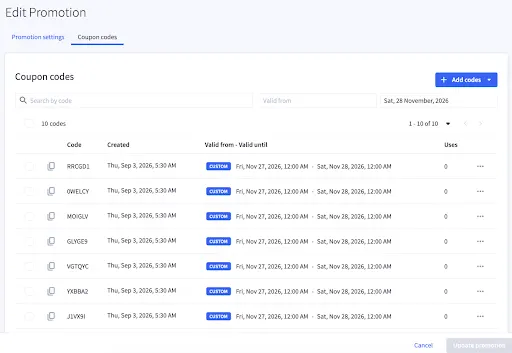
The Coupon codes tab shows each code's valid window at a glance, with a Custom badge marking codes that carry their own dates; all other codes simply show the promotion's schedule. Date filters above the table help you find a batch quickly. Validation keeps every window meaningful wherever dates are set. A code's dates must sit within the promotion's schedule, and an end date must fall after its own start.
Sample use cases
Waves and windows come in more flavors than the holiday rush. Here are a few ways to put code scheduling to work:
Use Case | Setup | Outcome |
Staged seasonal release | Run the offer year-round; generate a holiday batch valid Nov 27 – Dec 31. | Gift-insert codes work exactly when the campaign promises, with no separate promotion to build. |
Partner batches | Give each partner's batch its own start and end dates within one promotion. | Partners launch on their own calendars while you manage a single offer. |
ERP-synced codes | Match a master code's window to the dates your ERP expects. | The code your ERP tracks redeems on precisely the schedule it relies on. |
Early-access window | Two batches in one promotion: VIP codes valid from launch day, general codes from a week later. | Early access without cloning the promotion or touching its schedule. |
Planning your coupon code schedules
A few behaviors worth knowing as you fold code scheduling into your campaigns:
Follows the promotion until you say otherwise. Every code starts on the promotion's dates, and custom windows are opt-in per batch, so there's nothing new to manage unless you want the control.
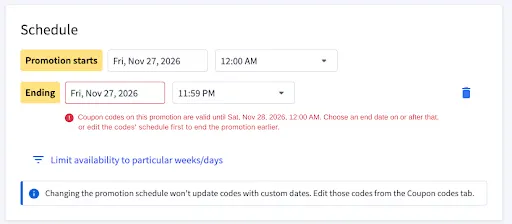
Custom means yours to manage. Moving the promotion's schedule won't move codes with custom dates; edit those from the Coupon codes tab when plans change.
No end date, no problem. While the promotion runs open-ended, its codes can too. Add an end date to any batch when you want one, or clear it again. Once the promotion itself takes an end date, every custom window carries an explicit end as well.
Schedule changes respect your codes. Every custom window has to fit inside the promotion's schedule. That means the promotion can't start after a custom code starts, can't end before one ends, and can't take an end date while any custom code runs open-ended. Edit or reset those codes first, then change the promotion.
Built for batches. Scheduling belongs to bulk-code promotions, where distribution happens in waves. A single-code promotion simply follows its own schedule, as it always has.
The final word
Coupon Code Scheduling lets one promotion do the work of many — season passes and day tickets, all sold from the same box office.
Set the offer once, then hand each batch of codes the dates it needs, and let checkout enforce the rest.
See Automatic and Coupon Promotions in the Help Center to learn more about configuring coupon promotions with the standard editor.

There's a lot to love ❤️
Watch a demo to see the BigCommerce platform in action.