Start & build


Launch Services
Overview
Chart your path to success with specialized services.Implementation Project Management
Experts to ensure you launch on time and under budget.Solution Architecture
Seasoned advisors to help you best design your store.Data Migration & Optimization
Expertise on a clean and clear path to migrating your data.Enterprise Launch Package
Personal training on how to set up and launch your BigCommerce Store.

Professional Services Blog Series
Get to know our teams and how they support your success in this Q&A series.


Localized Simplicity: Adaptive Pricing Now Available With Stripe OCS on BigCommerce
Create your store and start selling today.
Create your new website.
See if the BigCommerce platform is a good fit for your business.
No credit card required.

Written by
Aleksandr Topchienko08/14/2026
Localized Simplicity: Adaptive Pricing Now Available With Stripe OCS on BigCommerce
Get The Print Version
Tired of scrolling? Download a PDF version for easier offline reading and sharing with coworkers.
A link to download the PDF will arrive in your inbox shortly.
Key Highlights
Customers can pay in their local currency across more than 150 countries.
Stripe uses AI to determine a shopper's relevant presentment currency and automatically calculates localized prices.
Stripe guarantees the exchange rate used for localized pricing for 24 hours.
Local-currency pricing can make compatible alternative and local payment methods available to international shoppers.
Following a successful open beta, Adaptive Pricing became generally available with Stripe OCS on August 6, 2026
Adaptive Pricing is automatically enabled for eligible new Stripe OCS stores and upgrades, while custom checkout stores must use Checkout SDK version 1.948.1 or later to activate the feature
Stripe Adaptive Pricing: Currency localization made simple
Cross-border ecommerce just got simpler.
Stripe Adaptive Pricing is now generally available with Stripe Optimized Checkout Suite (OCS) on BigCommerce, giving eligible stores a simpler way to offer international shoppers localized currencies at checkout.
With Adaptive Pricing, Stripe OCS stores can let customers pay in their local currency in more than 150 countries across North and South America, Europe, Asia, Oceania, and Africa.
What is Stripe Adaptive Pricing?
On BigCommerce, Stripe Adaptive Pricing helps businesses create a more localized checkout experience by allowing eligible international shoppers to pay in local currencies without requiring merchants to manually manage currency conversion for every market.
Stripe Adaptive Pricing streamlines pricing for both businesses and their customers by:
Using AI to determine the most relevant presentment currency for a shopper based on their location.
Calculating localized price in real time, handling currency conversion automatically.
Giving shoppers the option to choose whether they pay in the store’s integration currency or their available local currency.
Enabling greater transparency after selecting local currency, displaying the full amount charged by Stripe at checkout. No unexpected bank conversion fees after purchase, no surprises.
Local currency can also unlock compatible alternative and local payment methods that require transactions to be presented in a specific currency. For growing BigCommerce businesses, that can mean a checkout experience that feels more relevant to customers in different markets while also expanding access to compatible local payment methods.
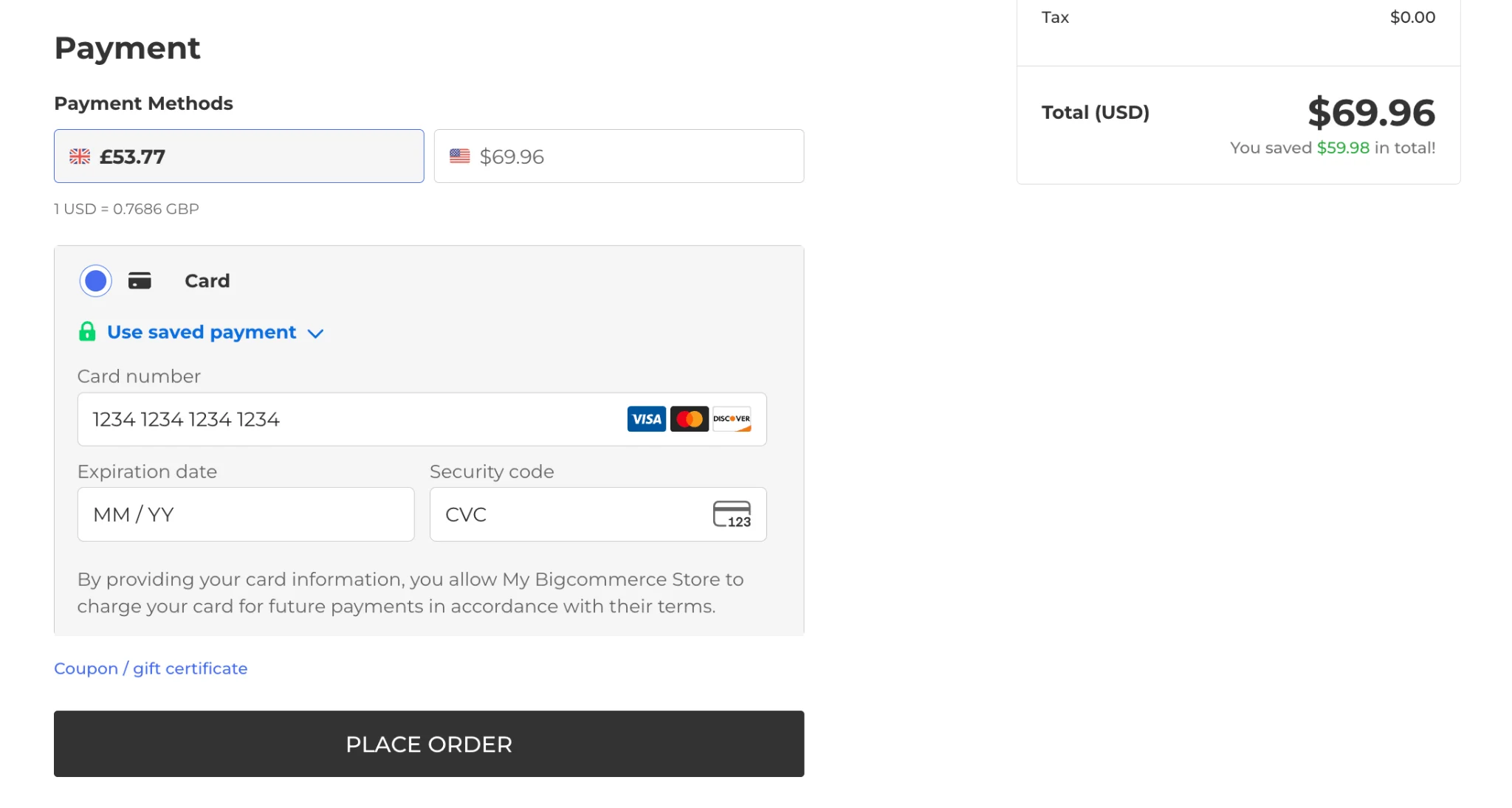
Businesses do not pay additional Stripe fees to use Adaptive Pricing. Instead, Stripe includes a 2-4% currency conversion fee, set by Stripe, in the exchange rate presented to the shopper. If a shopper chooses to pay in the store's settlement currency instead, their bank's exchange rates and fees may apply.
Why Adaptive Pricing matters for cross-border ecommerce
For BigCommerce businesses selling internationally, localized currency options can reduce checkout friction by letting shoppers see and pay in a familiar currency without hassle.
Instead of asking customers to calculate exchange rates themselves, businesses can offer localized pricing directly within the payment experience, simplifying checkout.
Adaptive Pricing helps on the business end too, giving international shoppers these currency options while also reducing the operational work required for businesses to support localized payments.
Adaptive Pricing is automatically enabled for eligible stores
For eligible BigCommerce stores using Stripe OCS, Adaptive Pricing is automatically enabled in their Stripe settings. Stores that upgrade from legacy Stripe versions to OCS also get Adaptive Pricing on by default. Businesses can disable Adaptive Pricing at any time.
BigCommerce stores that meet the following requirements are eligible for Adaptive Pricing:
Use Stripe OCS
Use Elements with Checkout Session (EwCS)*
Use Authorize & Capture transaction type
*EwCS is already enabled to all BigCommerce stores with a checkout type of Optimized One Page Checkout.
How to enable Adaptive Pricing for a custom checkout
BigCommerce stores using custom checkout experiences must complete an additional implementation step before enabling Adaptive Pricing.
To use Adaptive Pricing, custom checkout stores must update their Checkout SDK to version 1.948.1 or later.
Once the Checkout SDK requirement is met, Adaptive Pricing can be enabled in the BigCommerce Control Panel:
Go to Settings › Payments
Select Stripe
Select the Adaptive Pricing checkbox
When Adaptive Pricing is activated for a custom checkout store, EwCS is enabled automatically.
For implementation guidance, see Integrating Stripe Adaptive Pricing for custom checkouts.
The final word
Expanding cross-borders is about more than reaching new markets — it’s about creating a checkout experience that feels familiar to customers wherever they shop.
Stripe Adaptive Pricing helps BigCommerce businesses reduce currency friction by presenting localized prices, supporting compatible local payment methods, and handling currency conversion automatically.
According to Stripe, Adaptive Pricing increases cross-border revenue by 17.8% on average.
Read more about Stripe Adaptive Pricing on our Help Center.
⏰ Isn't about time that you evaluated your ecommerce platform?
Request a demo to see how the BigCommerce platform is different.