




Written by
John Shieldsmith10/28/2026

AI Shopping Assistants for Ecommerce: What They Do and Who Owns the Conversation
Get The Print Version
Tired of scrolling? Download a PDF version for easier offline reading and sharing with coworkers.
A link to download the PDF will arrive in your inbox shortly.
Key highlights
An AI shopping assistant is conversational software on your own storefront that helps shoppers find products, get answers, and check out.
Chatbots follow scripts, AI shopping assistants help shoppers decide on your site, and AI shopping agents shop across sites on the shopper’s behalf.
When the assistant runs on your storefront, you keep the brand voice, the shopper signal, and the customer relationship.
Your platform should cover the data and commerce baseline natively, and marketplace apps add chat, support, and merchandising.
Start with clean product data, launch one assistant on your highest-traffic category, and measure for 60 to 90 days before expanding.
Unlike chatbots, which are scripted and limited in capabilities and responses, an AI shopping assistant is far more versatile. If a chatbot is a broom, an AI shopping assistant is a Roomba.
But then there are AI shopping agents, which live outside a merchant’s site and can come from just about anything. The ChatGPT and Perplexity brands of the world.
While understanding the differences between the two is important, it’s not the real issue in 2026. Now, it’s more about who owns the conversation: the merchant, or the third-party platform that sits between the merchant and customer.
This is an increasingly important distinction to make. US retail sites saw a 393% YoY increase in AI traffic during Q1 2026. More and more often customers are using AI to fetch products from sites for them, and determining who owns that entire conversation is only going to become a bigger matter to tackle.
Let’s take a look at the differences between assistants and agents and chatbots, who owns the conversation, and what you as the merchant should keep in mind as you wade further into this AI-driven world.
AI shopping assistant vs. AI shopping agent vs. chatbot: what’s the difference
At a glance, an AI shopping assistant, AI shopping agent, and chatbot can look pretty similar. They all play a role in helping a customer, and they can all interact with your store to some degree.A chatbot answers questions, an AI shopping assistant helps a shopper decide on the merchant’s own site, and an AI shopping agent shops on the customer’s behalf across sites.
Chatbot | AI shopping assistant | AI shopping agent | |
Where it runs | Your site, usually a help page or chat widget | Your storefront: product, category and cart pages | A third-party platform, outside your site |
Who owns the conversation | You, though there isn’t much of a conversation | You | The platform, mostly |
Data it reasons over | Scripted answers and keyword-to-page rules | Your catalog, inventory, pricing, policies, and order data | The open web and many merchants’ feeds at once |
Autonomy | None. It responds; it doesn’t decide. | Recommends, narrows options, compares, builds the cart. | Can transact. Compares across stores and, in some cases, buys. |
Brand voice | Fixed script you wrote once | Merchant-controlled: your tone, vocabulary, and banned phrases | Platform-controlled: describes your products in its own words based on your product data |
Shopper signal you capture | Partial: keyword hits, not intent | Full: every question, objection, and abandoned intent, logged | Little to none: usually the referral or the order, not the conversation |
Typical checkout path | Sends a link; the shopper checks out on your site | Builds the cart, then hands off to your checkout | Usually hands off to your checkout. Some platforms now complete the purchase in chat, such as Perplexity and Microsoft Copilot in the US. For BigCommerce merchants, Google’s UCP-powered checkout in AI Mode and Gemini is available now in early access. |
Typical 2026 example | Rules-based ecommerce chatbot for FAQs and order status | Native storefront assistant, or a conversational app from the marketplace | General AI assistants with shopping (ChatGPT shopping, Google AI Mode, Perplexity) and marketplace assistants (Amazon’s Alexa for Shopping) |
Worth noting, vendors don’t use these labels consistently. BigCommerce’s Shopping Agent, for example, runs on your storefront, so it works as an AI shopping assistant by this article’s definition. What matters is where it runs and who owns the conversation.
Ecommerce chatbot: scripted, reactive, answers what it’s told.
A chatbot is the oldest of the three options, and far more simplistic in what it can do. It’s scripted, reacts to various prompts, and answers only in a way that it’s been programmed to.
For instance, if someone mentions a “standing desk” the chatbot will match the keyword to a category and send the customer a link. If someone says “returns” it will provide them the return policy.
Rules-based ecommerce chatbots are cheap and predictable. They’re a good fit for order tracking and FAQ deflection, but they can’t hold the kind of back-and-forth that conversational commerce depends on. They can’t weigh tradeoffs or compare products, but they’re not meant to.
AI shopping assistant: conversational, catalog-grounded.
An AI shopping assistant goes beyond a chatbot, offering a conversational experience that’s grounded in your catalog.
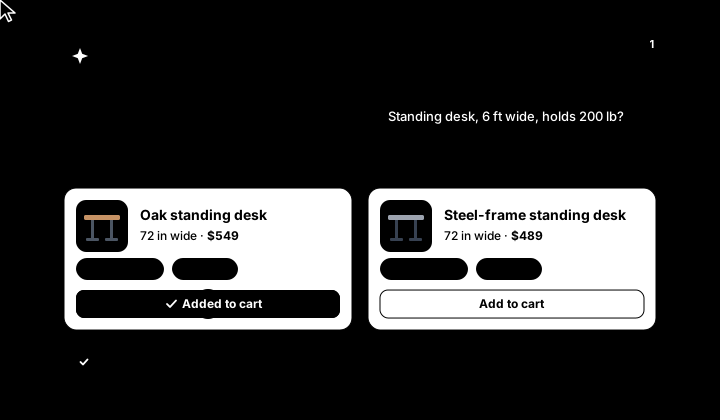
Going back to the “standing desk” search example, where a chatbot would simply match the keyword and send a link, the AI shopping assistant will understand a more nuanced query. A customer could instead tell the assistant, “Show me a standing desk that’s six-feet wide and holds 200 pounds.”
From there, an AI shopping assistant can surface in-stock options, show their weight limits, and even note that one of them ships free this week or is currently on sale. And best of all, this entire exchange is logged, allowing the merchant to learn from it and note any areas they’d like to improve as well.
Note: Don’t confuse AI shopping assistants with recommendation engines, which run in the background and use machine learning and generative AI to surface personalized content and product recommendations on your site.
AI shopping agent: autonomous, capable, potentially third-party.
Unlike a chatbot or AI shopping assistant, an AI shopping agent can live on a third-party platform, like ChatGPT or Perplexity. This allows the agent to pull from multiple sources and merchants. On top of this, an AI agent is more capable than either of its predecessors, with the ability to add products to cart and even complete purchases in some cases.
Note: Many of these capabilities depend on whether the platform’s checkout program supports it via various protocols (more on these later).
Returning to the “standing desk” scenario, a shopper could tell their AI agent, “I need a standing desk that’s six-feet wide and capable of holding 200 pounds.” The agent would then surface several options from different brands and merchants, comparing the prices and giving the shopper options.
Once the shopper picks the one they want, the AI agent can add the product to the cart and send the customer to the checkout, or in some cases, complete the checkout autonomously without the customer having to leave the chat window.
The shopper can also go a different route and ask the agent to further refine the results with statements like, “Show me options from brand X only” or “Can you find three more options that are cheaper?”
On the surface, it may sound as if AI shopping agents are at odds with the kinds of AI shopping assistants merchants can have on their site. In reality, these AI agents are an increasingly popular form of discovery, a core example of agentic AI in ecommerce, and a crucial piece of agentic commerce.
What an AI shopping assistant does across the shopper journey
AI shopping assistants provide quick, obvious value directly on your site: providing help to customers in the moment, guiding them to products, and enhancing the overall customer experience. But, they have a greater effect across the shopper journey, too.
To illustrate this, let’s take a look at a shopper’s journey from first search to repeat order.
Discovery: guided product finding and natural-language search.
First, our shopper turns to your botany site’s AI shopping assistant for help with a problem, rather than a product hunt.
The shopper asks for “something for a shady balcony that doesn’t need much water,” hoping to find a plant that suits their space.
The AI assistant turns that query into a filtered set of products that match their request, each of the plants requiring little water.
Before surfacing the products, the assistant asks clarifying questions like, “Does the balcony get any sunlight?” and “Does your area experience freezing temperatures?” The same clarifying questions a store associate would ask.
Think of this stage as the beginnings of a conversation a store associate would have with a customer who walked into a store. The customer may not know what it is they want, only what their limitations are and what it is they don’t want.
Consideration: comparisons, fit and compatibility questions, policy answers.
Next, the shopping assistant begins to guide the customer through the consideration phase, helping the customer compare options and find the best fit, while answering any policy questions that might arise.
The assistant compares a few plants based on the shopper’s criteria, then surfaces them for consideration from the person.
The assistant answers any further spec-related questions, like, “Is this plant considered good for beginners?” or “What kind of soil do I need for this plant?” or “Will this plant fit in a 10-inch pot I own?”
The assistant quotes shipping prices when asked, and pulls accurate return and warranty information straight from your own data — your single source of truth.
When the person asks a more nuanced question, “Can this plant share a pot with another plant I’m considering?” and the assistant can’t offer an answer, it hands it off to a human specialist, making sure to include the full context of the conversation.
The above workflows are beneficial even with smaller purchases, but only grow in value as the orders do. Imagine someone spending hundreds or thousands, and suddenly the benefit of having a 24/7 assistant that can escalate to support at the right moments becomes even more apparent.
Conversion: cart building, promo application, checkout handoff.
The shopper’s been helped, had their questions answered, and is ready to check out. But, the AI shopping assistant’s work isn’t over yet.
The AI assistant adds chosen items to the cart and applies eligible promotions for the shopper.
The assistant resolves any last-minute hesitations that often lead to abandoned carts, like a shipping cutoff or a product doubt.
The assistant hands off to your checkout rather than inventing its own, making it quick and easy for the shopper to finalize their purchase.
Worth noting, the above workflows can save even more time in the B2B space, where ordering is often more complex and time-consuming.
Post-purchase: order status, returns, reorders.
An AI assistant can continue making a difference even in the post-purchase phase. In fact, this is where a single purchasing customer can be potentially converted into a repeat buyer.
The shopper asks, “Where’s my order” to the assistant, which pulls from live order data and provides an up-to-date shipping status.
If the shopper wants to return their order upon receiving it, the assistant can easily start a return or exchange, ensuring it fits within your brand’s policies.
Once the customer has received their order, the assistant can easily suggest a reorder or add-on, like additional soil for their plant or nutritional supplements.
All of this comes together in true conversational commerce, driving an improved customer experience while saving your team precious time. And, it works: AI-referred traffic on US retail sites converts 54% better than non-AI traffic.
Who owns the conversation: storefront assistants vs. third-party AI shopping agents
An increasingly major concern and topic of discussion is the conversation itself, and more importantly: who owns it.
If an AI shopping assistant is running on your storefront, you maintain ownership. If it’s a third-party agent, the platform owns most everything. But, this doesn’t mean you shouldn’t still include third-party agents in your strategy.

What the merchant keeps when the assistant runs on the storefront.
An AI shopping assistant typically runs on your own store. As a result, you have more ownership than with third-party agents or platforms.
You keep:
Brand voice: You set the tone, the vocabulary, and the phrases the assistant never uses.
The full shopper signal: Every question, objection, and abandoned intent is yours to analyze.
The customer record: Conversations attach to your customer profiles, not someone else’s.
Merchandising control: You decide what gets recommended, promoted, or bundled.
The checkout: Payment, taxes, shipping, and post-purchase service run through your systems.
The biggest tradeoff here is that an on-site shopping assistant won’t surface the breadth of options and pricing variations as a third-party agent. This is because a third-party agent or platform can comb the open web and find the best deals.
But, again, an on-site assistant allows you to have more ownership and more data to work with after a conversation’s taken place.
What the merchant retains when the conversation happens on a third-party platform.
A third-party platform offers more flexibility for the shopper, but it does come at a price for the merchant: you don’t own the conversation nor as much of the data. But, there’s still shared territory and reason to ensure your data is optimized for these platforms.
You share:
Voice: The platform’s assistant describes your products in its own words.
Most of the signal: You typically see the referral or the order, not the conversation that led to it.
The relationship: The shopper may remember the platform, not the brand.
Ranking: The platform decides whether you’re the one recommended.
Again, as the merchant, you won’t own as much of the conversation when you’re appearing in third-party platforms. But, you’re likely going to show up in third-party platforms regardless, so the right move is making sure your data is optimized and ready to show up on ChatGPT, Perplexity, Copilot, and beyond.
How to layer native and app-based AI shopping assistants
It’s easiest to think of the relationship between your store and both assistants and AI agents as a series of layers. Your platform is the hub, supplying both the data and the commerce essentials. Meanwhile, third-party marketplaces apps can supply both the conversational and support layers, all of which comes together in a single customer experience.
But, what do these layers look like?
What the platform should handle natively.
Your ecommerce platform should handle a lot of the heavy lifting, making sure your store is legible to assistants, whether native or third-party.
On BigCommerce, this baseline includes:
Structured product data
AI-generated product titles, descriptions, and SEO metadata (available now in early access)
Catalog and cart APIs that let an assistant search, compare, and build a cart against live inventory and pricing
Storefront search and personalization foundations
Shopping Agent, BigCommerce’s native storefront assistant, which answers questions, compares options, and guides shoppers to purchase (available now in early access).
Lastly, BigCommerce features an agent-ready storefront layer. BigCommerce’s Storefront MCP exposes product discovery, product details, and cart creation to AI agents through an open protocol.
Note: Storefront MCP is in open beta as Early Access, easily accessible via a quick opt in from Settings → Early Access.
Where AI shopping assistant apps extend the baseline.
Marketplace apps should cover anything your platform doesn’t: conversational support, live-chat handoff, advanced merchandising, and proactive engagement.
Within the BigCommerce app marketplace, there are numerous verified AI shopping assistant apps, including:
Gorgias: ecommerce helpdesk with AI chat and full order context on every ticket.
Tidio: Lyro AI chatbot plus live chat and a shared inbox.
LiveChat: real-time chat with cart and order visibility and rich product cards.
Klevu: AI search, category merchandising, and recommendations.
Social Intents: live chat from Slack or Teams with AI chatbots trained on your site content.
Chatway: AI chatbot with human takeover and multilingual chat.
Nosto: AI personalization, including product recommendations and dynamic content.
The above is only a sampling of the options available. For more choices, browse the full ecommerce AI category.
How to decide what you need.
Everyone has different business goals and objectives, but in this new age of commerce, it’s essential your products are at least visible to AI agents for ecommerce. On top of this, utilizing AI shopping assistants will only help you in the long run.
To establish a strong foundation and set yourself on the path to delivering more personalized shopping experiences for customers, do the following:
Start native: Clean up product attributes, policies, and inventory so any assistant has accurate data to reason over.
Add one conversational app: Choose one third-party conversational app and scope it to your highest-traffic category to start.
Measure progress: Monitor your assistant’s performance across 60 to 90 days using the metrics called out in the next section.
Expand: Slowly cover more categories or channels with your current app, or add a second app only after the first one has proven its worth.
If you aren’t happy with the results of your third-party app, or you’re finding it difficult to use, too expensive, etc. don’t be afraid to pull the plug and try something new. You want to get this right early on so you can set yourself up for long-term success.
How to evaluate and configure a storefront assistant
Before choosing a storefront assistant, it’s important to have the right evaluation framework in mind.
A storefront assistant exists to help you streamline and enhance the customer experience, much like an employee would. So, treat your assistant evaluation much like you would a new hire, checking for accuracy, how well it listens (control), and overall fit.
Questions to ask any vendor:
Does it read live inventory and pricing, or a cached copy?
Can it apply promotions and build a cart?
Can we control tone, vocabulary, and banned phrases?
Can it hand off to human support with conversation context attached?
Where does conversation data live? Can we export it?
Does it work across headless storefronts and other channels?
How does it disclose to shoppers that they’re talking to AI?
What does it cost per conversation, per resolution, or per seat?
Will the vendor use our conversation data to train its models?
The above questions will help you find an AI assistant that can handle the right tasks, while ensuring you’re being transparent about AI use and retaining the right data.
Once you’ve found the right vendor, it’s time to configure your AI shopping assistant following a series of steps.
1. Ground it in your catalog and policies.
Connect the assistant to your product catalog, inventory, pricing, and order data — not a static FAQ export. Load shipping, returns, and warranty policies as source documents. Scope its first release to questions you can easily and confidently verify, and have it route everything else to a person.
2. Set the brand voice and guardrails.
Most modern AI shopping assistants can be customized to fit your brand voice, making it possible to deliver a guided selling experience that’s still unique. And, with the right guardrails in place, you can prevent it from saying the wrong thing, and keep workflows realistic.
Have your AI assistant delivering on-brand, tailored recommendations in no time by writing a voice guide that covers:
How formal or playful your assistant is
Which words your assistant can use and not use
What claims the assistant can never make, like a delivery date that’s not in alignment with standard policy
You also want to ensure your assistant discloses right out of the gate that it’s an AI, and will collect only the data it needs while not sharing or training third-party models.
3. Design the human handoff.
The human handoff is critical to the successful use of an AI assistant, allowing you to work toward better customer retention, and more accurate and timely support.
Make sure the handoff happens when it needs to by deciding on the right triggers:
Explicit requests for human support
Questions that aren’t addressable via policies, documents, and data
Refunds going over a threshold
Various words of frustration
It’s important the assistant includes the transcript and any items in the cart when handing things over to the human support specialist, as this prevents the customer from having to repeat anything.
4. Measure what matters and iterate.
Remember: Once you have your AI assistant set up, you want to monitor performance over a 60-90 day period before deciding on any adjustments that need to be made (or determining that the assistant isn’t the right fit).
The following should be tracked each month, both during the review period and on an ongoing basis:
Conversation-assisted conversion rate and assisted average order value (AOV)
Containment rate (resolved without a human) and handoff rate
Customer satisfaction score (CSAT) after a handoff
Top unanswered questions. (These can indicate catalog or content gaps.)
Regarding the unanswered questions, take this information and return to step 1, training your assistant so it can resolve these questions in the future.
The final word
Handing over the customer conversation to an AI shopping assistant can feel like giving up control, but it doesn’t have to be. With the right setup, you can still own the data and the conversation, and ultimately the customer relationship.
Turn the data that powers your store into an even greater asset, letting it also power an AI shopping assistant. Start by:
Auditing your product data and policies so an assistant has something accurate to reason over.
Establishing a native baseline and choosing one marketplace app, then launching it on your highest-traffic category.
Expanding your efforts to agent channels and beyond once you’ve proven the on-store experience.
Ready to see what this could look like on your store? Explore BigCommerce’s agentic commerce capabilities or start a free trial today.
FAQs about AI shopping assistants
An AI shopping assistant is conversational software on a merchant’s storefront that helps shoppers find products, answer questions, and move to checkout. It reasons over the merchant’s catalog, inventory, and policies, and speaks in the brand’s voice. It differs from a general agentic AI assistant in that the merchant controls the data and keeps the conversation.
An AI shopping assistant helps a shopper with personalized product recommendations, while a chatbot answers based only on what it’s told. Chatbots follow scripts and decision trees, so they’re predictable but can’t compare products or weigh tradeoffs. An AI shopping assistant uses live catalog data and even purchase history to recommend, compare, and build a cart. Rules-based chatbots still earn their place for order tracking and FAQ deflection.
An AI shopping assistant works on one merchant’s site and recommends, while an AI shopping agent works across sites and may buy on the shopper’s behalf. Agents such as ChatGPT, Google AI Mode, and Alexa for Shopping are discovery channels where the platform owns the conversation. With an assistant, the merchant owns the conversation.
Data from 2026 points toward AI shopping assistants increasing ecommerce conversions, with AI-referred visitors to US retail sites converting 54% better than non-AI traffic. Meanwhile, retailers using branded AI agents saw 6.2% growth to holiday sales, versus 3.9% for those without.
Start with your platform’s native data and catalog foundations, then add a conversational app from the marketplace. On BigCommerce, clean up product attributes and policies, opt into Storefront MCP under Settings → Early Access if you want an agent-ready storefront layer, and install an app like Gorgias or Tidio. Launch the assistant in one category, measure, and expand.
Pricing varies by model more than by rate. Common structures are per seat, per conversation, per resolution, or a revenue share on assisted sales. But, many apps offer a free tier for low volumes.
They can be, but you have to choose and configure them with care. Look for data minimization, clear disclosure that shoppers are talking to AI, exportable conversation data, and a contractual commitment not to train third-party models on your customer data without consent. Lastly, keep the assistant’s access scoped to what the conversation needs.
A well-configured assistant escalates on defined triggers and passes full context to the agent. Triggers typically include an explicit request, detected frustration, sensitive topics, or questions it can’t answer confidently. The transcript and cart move with the shopper so they don’t have to repeat themselves. Measure handoff rate and post-handoff CSAT to determine if you need to adjust any triggers.
To improve chatbot accuracy in ecommerce, a variety of AI and NLP technologies enable chatbots to better understand and respond to customer needs:
Natural Language Understanding (NLU): Helps chatbots interpret customer intent, even with typos or casual language, creating smoother interactions that mimic human conversations.
Machine Learning (ML): Enables chatbots to learn from past interactions, fine tuning functionality and responses over time.
Sentiment analysis: Detects customer emotions, allowing chatbots to adjust tone or escalate conversations when necessary.
Contextual memory: Lets chatbots remember past interactions, enabling personalized instant responses for returning customers.
Named Entity Recognition (NER): Identifies specific information, like product names or order numbers, to deliver relevant answers.
Transformer models (e.g., BERT, GPT): Help chatbots understand phrases in context for more accurate, complex answers.
Reinforcement Learning (RL): Allows chatbots to learn from feedback on successful interactions, adjusting to better meet customer needs.
To handle inquiries that require human assistance, chatbots use smart escalation features:
Escalation protocols: Chatbots recognize when an issue is complex or sensitive, automatically directing customers to a human agent.
Intelligent routing: Based on issue type and urgency, chatbots route customers to the right support team or specialist.
Seamless handoffs: Chat history and customer context are transferred to agents, reducing the need for customers to repeat information.
Sentiment detection: Chatbots use sentiment analysis to sense frustration, proactively escalating to human support when needed.
With these tools, chatbots efficiently manage straightforward tasks while ensuring complex issues receive a human touch.
Chatbots need to be continuously maintained and improved. For example, certain conversation pathways might not lead to goal completion, or an escalation trigger might fail.
Here are the top KPIs to measure chatbot success:
Conversation completion rate: Track the percentage of completed conversations without requiring escalation to a human agent.
User satisfaction: Measure user satisfaction through surveys, feedback forms, or sentiment analysis to assess how satisfied users are with the chatbot's performance.
Response time: Faster response times contribute to a positive user experience and demonstrate the chatbot's efficiency in providing timely assistance.
First Contact Resolution (FCR): Determine the percentage of user inquiries resolved during the first interaction with the chatbot, without the need for escalation or follow-up.
Escalation rate: A lower escalation rate signifies that the chatbot can handle various user inquiries and reduces the burden on human agents.
Customer engagement rate: Measure the number of interactions per session and average session duration. Higher engagement rates indicate online shoppers find value in the chatbot and are willing to interact with it repeatedly.
Given their popularity with large online retailers, chatbot solutions will continue to grow more sophisticated — providing personalized customer experiences and driving sales.
Here are some trends to watch in this space:
Transactional chatbots: AI chatbots are evolving beyond providing information to facilitating transactions. They enable customers to browse products, add items to their cart, and complete payment within the chat interface — also known as conversational commerce.
Image recognition: Chatbots that recognize images as inputs can help customers find similar products or match their desired style.
Multilingual support: Global brands require chatbots that support multiple languages and provide localized support.
Chatbot-human collaboration: Chatbot providers are constantly reprogramming their bots to improve escalation and AI-human handoffs, ensuring customers receive a personal touch when complex or sensitive issues arise.
Common ecommerce chatbot mistakes include: failing to provide a seamless human handover, neglecting to test for accuracy (leading to AI hallucinations), and setting unrealistic expectations for an AI chatbot’s capabilities.
Other critical errors include lacking a clear, ROI-driven strategy, programming robotic, non-conversational flows, and ignoring the need for ongoing maintenance.
Chatbots reduce customer support costs in a few ways.
By automating up to 80% of routine, high-volume inquiries (e.g., password resets, order tracking) 24/7 without adding extra human headcount, salary, or overtime, chatbots enable ecommerce businesses to handle thousands of conversations simultaneously, lowering the average cost per interaction.
Chatbots reduce online cart abandonment by providing instant, 24/7 support that resolves hesitation, answers product/shipping questions, and offers personalized, real-time incentives. Bots do this by detecting exit-intent, proactively engaging customers, guiding them through checkout, and recovering lost sales via reminders on websites or apps.
Ecommerce chatbots support personalization without compromising privacy for customers and businesses in a few ways.
By employing data minimization, chatbots focus on only the information necessary for a specific interaction (e.g., current session browsing) and utilize techniques to remove personally identifiable information (PII) from data sets, ensuring privacy is maintained.
In addition, bots use anonymized or pseudonymized data, and operate under strict consent-driven frameworks, leveraging real-time behavioral cues — rather than deep personal histories — and use technologies such as federated learning and data encryption in order to ensure customer trust while delivering curated shopping recommendations.
Chatbots, live chat, and helpdesk tools are similar, in that they are all customer support technologies. The ways they differ significantly relies on who operates them (human vs. bot), how they work (real-time vs. asynchronous), and their primary use cases. Here’s a further breakdown:
Chatbots are able to provide automated, 24/7 instant responses to simple queries using AI or scripts.
Live chat connects customers with human agents for personalized, empathetic, or complex assistance.
Helpdesk tools are backend systems that organize, track, and manage customer requests from multiple channels over a longer, asynchronous timeline.
Enterprise companies that adopt chatbots should prioritize data privacy (including GDPR/HIPAA compliance), security, and seamless integration with existing systems (CRM/ERP) to ensure operational efficiency.
A few more key considerations for enterprise businesses include:
Maintaining AI accuracy to avoid hallucinations
Establishing clear human oversight
Defining strict data retention policies
Ensuring scalability for diverse, multichannel customer interactions

Find your favorite features.
Explore all of the capabilities of the BigCommerce platform.